concept container in category microservice

This is an excerpt from Manning's book Bootstrapping Microservices with Docker, Kubernetes and Terraform.
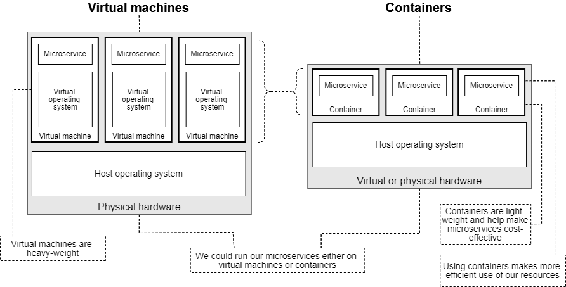
Containers are often compared to virtual machines (VMs). Both VMs and containers allow us to isolate our microservices which prevents them from interfering with each other. Before containers were invented we ran our services in virtual machines and indeed these days we can still choose to do that when appropriate. Figure 3.1 compares virtual machines to containers so you can see the differences.
As you can see in figure 3.1 virtual machines are more heavy-weight than containers. A virtual machine contains a complete copy of its operating system that’s running on fully virtualized hardware. A container on the other hand virtualizes the operating system rather than the hardware. So a container is smaller, does less work and makes more efficient use of our computing resources.
Ultimately we’ll have many containers running on our Kubernetes cluster, but for now, we are aiming to instantiate just a single container to host the video streaming microservice we created in the previous chapter.
CMD npm config set cache-min 9999999 && \
    npm install && \
    npm run start:dev

This is an excerpt from Manning's book Microservices in .NET Core, Second Edition.
Containers are a way of wrapping an application - or in our case a microservice - in a portable image that brings along everything it needs to run from operating system to application code to library dependencies. A container image can be built once, moved to different environments and still be expected to work - as long as the application code in the container does not make assumption about the environment. In this sense containers are similar to virtual machines. But where virtual machines virtualize the hardware containers virtualize the operating systems, which allows containers to be much smaller. This is important in a microservice context where we are going to have many, many microservices. With containers we are able to run many microservices on the same server while maintaining a good level of isolation between them.
Listing 3.1. Dockerfile for the Shopping Cart
language="sql" linenumbering="unnumbered">FROM mcr.microsoft.com/dotnet/core/sdk:3.1 AS build  #1
WORKDIR /src
COPY ["ShoppingCart/ShoppingCart.csproj", "ShoppingCart/"]
RUN dotnet restore "ShoppingCart/ShoppingCart.csproj" #2
COPY . .
WORKDIR "/src/ShoppingCart"
RUN dotnet build "ShoppingCart.csproj" -c Release -o /app/build #3

FROM build AS publish
RUN dotnet publish "ShoppingCart.csproj" -c Release -o /app/publish #4

FROM mcr.microsoft.com/dotnet/core/aspnet:3.1 AS final  #5
WORKDIR /app
EXPOSE 80                                               #6
COPY --from=publish /app/publish .                      #7
ENTRYPOINT ["dotnet", "ShoppingCart.dll"]               #8
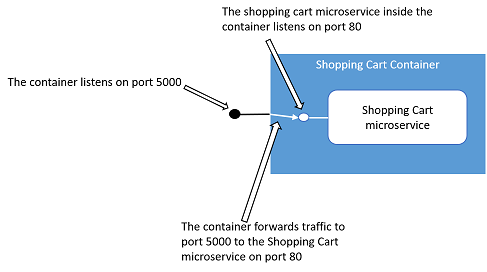
-p 5000:80means that the container exposes port 5000 and listens to traffic on that port. Any incoming traffic to port 5000 is forwarded to port 80 inside the container
'shopping-cart' is the name of the container image to run
Figure 3.2. The shopping cart listens to port 80 inside the container. The container listen to traffic on port 5000 and forwards that traffic to the Shopping Cart microservice.
This confirms that we have successfully build a container with the Shopping Cart. All we had to do was create a Dockerfile that describes how to build the container and then use Docker to build it. From that we got a portable container image. This is quite nice because it enables us to run the exact same container image in all the environments we want including both localhost and production. Since we can run the same image across different environments we can be reasonably confident that it will work the same across environments.

This is an excerpt from Manning's book Microservices Security in Action.
Capital One, one of the leading financial institutions in the United States, announced in July 2019 that its microservices deployment consists of thousands of microservices on several thousands of containers, with thousands of Amazon Elastic Compute Cloud (EC2) instances. Monzo, another financial institution based in the United Kingdom, recently mentioned that it has more than 1,500 services running in its microservices deployment. Jack Kleeman, a backend engineer at Monzo, explains in a blog (http://mng.bz/gyAx) how they built network isolation for 1,500 services to make Monzo more secure. The bottom line is, large-scale microservices deployments with thousands of services have become a reality.
Managing a large-scale microservices deployment with thousands of services would be extremely challenging if you didn’t know how to automate. If the microservices concept had popped up at a time when the concept of containers didn’t exist, few people or organizations would have the guts to adopt microservices. Fortunately, things didn’t happen that way, and that’s why we believe that microservices and containers are a match made in heaven. If you’re new to containers or don’t know what Docker is, think of containers as a way to make software distribution and deployment hassle-free. Microservices and containers (Docker) were born at the right time to complement each other nicely. We talk about containers and Docker later in the book, in chapter 10.
Figure E.1 The evolution of containers started in 1982 by introducing chroot to the Berkeley Software Distribution (BSD).
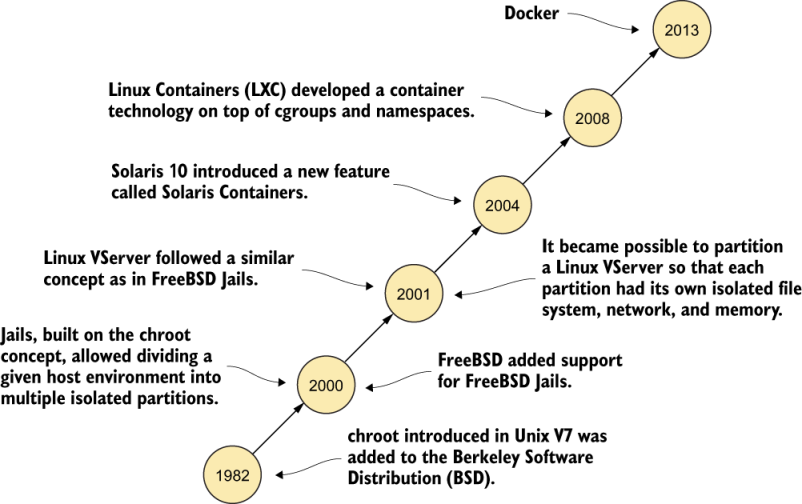
In 2004, Solaris 10 introduced a new feature called Solaris Containers (also known as Solaris Zones). Like FreeBSD Jails, Solaris Containers provided operating system-level virtualization. Then Google introduced Process Containers in 2006 as a way of building isolation over the CPU, disk I/O, memory, and network. A year later, Process Containers were renamed and added to Linux Kernel 2.6.24 as control groups (cgroups). In 2008, Linux Containers (LXC) developed a container technology on top of cgroups and namespaces. The cgroups and namespaces are fundamental to the containers we see today. Docker, up to version 1.10, is based on LXC (more details in section E.13). We further discuss cgroups and namespaces in detail and how these are related to Docker in sections E.13.4 and E.13.5.
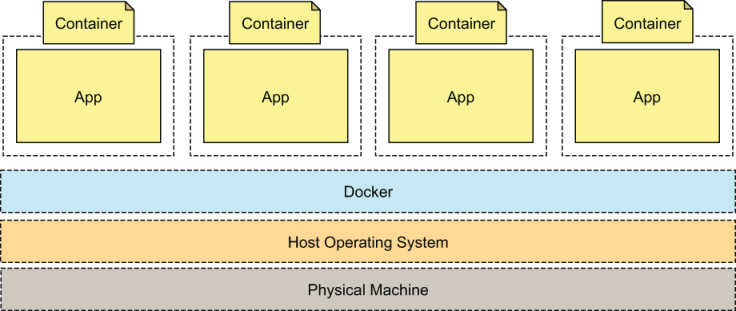
Unlike in a VM, a container doesn’t carry its own guest operating system; rather, it shares the operating system kernel with the host. Figure E.3 shows that the containers with the applications run on a Docker layer. But in reality, there’s no Docker layer, as the container itself is a construct of the Linux operating system. The containers run on the kernel itself.
Figure E.3 Each container shares the operating system kernel with the host. Each application runs in its own container, and the applications are isolated from each other.
Docker natively runs on Linux. To run Docker on other platforms, we use a VM with the Linux operating system and run Docker on top of that (we discuss this in detail in section E.1.4). Because a container doesn’t carry a guest operating system, but only the bare minimum software packages required to run the application, it’s far more lightweight than a VM. That makes containers the preferred option to package and distribute microservices. Also, because a container has no guest operating system, the time it takes to boot a container is far less than that of a VM.
In terms of packaging, we follow the pattern of one application per container: a container represents a single process. Having one process per container helps us address scalability requirements more smoothly. We can’t just scale a process with the load, but we can horizontally scale a container, which carries a process. If we have multiple processes running in the same container but with different scalability requirements, it would be hard to address that just by scaling the container. Also, running multiple applications in a single container defeats the purpose of a container, as there’s no isolated environment for each application, and this further creates a management nightmare.
When we start a container from the
dockerruncommand, we can specify a name for the container by passing thenameargument. In the following command, we start a Docker container from thehello-worldimage with the container namemy-hello-world:\> docker run --name my-hello-world hello-worldIn case we skip the
nameargument, Docker then assigns a generated universally unique identifier (UUID) as the name of the container. In addition to the name, a container also carries an ID (container ID), a randomly generated identifier that can’t be changed. The main difference between the container ID and the container name is that we can change the name of a running container (usingdocker rename), but the container IDs are immutable. It’s always better to give a container a name that’s human readable or easy to remember. This helps you perform certain operations on a running container. Otherwise, if you want to do something on a container, first you need to find out the corresponding container ID or the system-generated container name.

This is an excerpt from Manning's book Microservices in Action.
Our experience suggests the best tools for this job are containers. A container is an operating system-level virtualization method that supports running isolated systems on a host, each with its own network and process space, sharing the same kernel. A container is quicker to build and quicker to start up than a virtual machine (seconds, rather than minutes). You can run multiple containers on one machine, which simplifies local development and can help to optimize resource usage in cloud environments.
Containers standardize the packaging of an application, and the runtime interface to it, and provide immutability of both operating environment and code. This makes them powerful building blocks for higher level composition. By using them, you can define and isolate the full execution environment of any service.
Figure 8.17 A container scheduler executes containers across a cluster of nodes, balancing the resource needs of those nodes.

Containers are an elegant abstraction for deploying and running microservices, offering consistent cross-language packaging, application-level isolation, and rapid startup time.
In turn, container schedulers provide a higher level deployment platform for containers by orchestrating and managing the execution of different workloads across a pool of underlying infrastructure resources. Schedulers also provide (or tightly integrate with) other tools — such as networking, service discovery, load balancing, and configuration management — to deliver a holistic environment for running service-based applications.
Containers aren’t a requirement for working with microservices. You can deploy services using many methods such as using the single service per VM model we outlined in the previous chapter. But together with a scheduler, containers provide a particularly elegant and flexible approach that meets our two deployment goals: speed and automation.
You should note a few things here. The
–-interactive(or–i) flag indicates that the container should be interactive, accepting input from STDIN, whereas the–-tty(or–t) flag connects a terminal for user input to the Docker container. When you started the container, it executed the default command set within the image. You can check what that is by inspecting the image metadata:$ docker image inspect python:3.6 --format="{{.Config ➥.Cmd}}" #1 [python3] #1 The Docker image configuration is output as JSON, which you can parse using Go text templates. !@%STYLE%@! {"css":"{\"css\": \"font-weight: bold;\"}","target":"[[{\"line\":0,\"ch\":0},{\"line\":0,\"ch\":53}],[{\"line\":1,\"ch\":0},{\"line\":1,\"ch\":1}],[{\"line\":1,\"ch\":1},{\"line\":1,\"ch\":8}]]"} !@%STYLE%@!You can instruct Docker to execute other commands inside your container; for example, to enter the container at an OS shell, rather than Python, you could suffix the command you used to start the image instance with
bash.

This is an excerpt from Manning's book Testing Java Microservices: Using Arquillian, Hoverfly, AssertJ, JUnit, Selenium, and Mockito.
We presented the application’s technical details, along with the containers and databases it uses; we made these choices in order to present a larger spectrum of differing solutions. We also showed snippets of the application code where it’s important to understand why we’re using a specific approach when writing a particular test.
Docker is an open source platform that simplifies the creation, deployment, and running of applications in containers. Imagine a container as being like a box where you deploy an application along with all the dependencies it needs, neatly packaged. In packaging the application this way, you can ensure that the application will run in a well-defined environment (one provided by the container), regardless of the underlying operating system. This enables you to move containers from one machine to another—for example, from a developer machine to a production machine—without worrying about the external configuration.
You can think of Docker as a virtual machine, but without the need to install and set up the entire OS yourself. Docker reuses the same Linux kernel regardless of where the container is actually running. This approach gives your startup time a significant performance boost and reduces the size of the application.
Figure 8.1 shows a comparison between a VM and a Docker container. The primary difference is that instead of having a guest OS for each application, a container runs atop a machine OS.
The difference between an image and a container is that an image is all the bits and bobs, such as the application and configuration parameters. It doesn’t have state and never changes. On the other hand, a container is a running instance of an image on the Docker daemon.
Finally, you can write the test to validate that the image can be built and the container instantiated (code/video/c-tests/src/test/javahttps://livebook.manning.com/book/video/VideoServiceContainerTest.java).
Listing 8.16. Validating the image and the container
@RunWith(Arquillian.class)
public class VideoServiceContainerTest {


    @ArquillianResource
    DockerClient docker;

    @Test
    public void should_create_valid_dockerfile() {
        DockerJavaAssertions.assertThat(docker).container
                ("videoservice").hasExposedPorts("8080/tcp")       #1
                .isRunning();
    }

}