concept execution in category microservice

This is an excerpt from Manning's book Microservices Security in Action.
In a typical microservices deployment, the microservice that accepts requests from a client application becomes a trigger for the rest of the microservices involved in the flow of execution. This microservice can initiate both synchronous and asynchronous types of events to other microservices to trigger their execution.

This is an excerpt from Manning's book Microservices in Action.
Requesting execution of those orders against the specified holdings
Listing 6.1 Adding a retry to a service call
import requests
import logging
from tenacity import retry, stop, before    #1

class MarketDataClient(object):

    logger = logging.getLogger(__name__)
    base_url = 'http://market-data:8000'

    def _make_request(self, url):
        response = requests.get(f"{self.base_url}/{url}",
                                headers={'content-type': 'application/json'})
        return response.json()
 @retry(stop=stop_after_attempt(3),    #2
 before=before_log(logger, logging.DEBUG))    #3
    def all_prices(self):
        return self._make_request("prices")

#1   Imports relevant functions from the library
#2   Retries the query up to three times
#3   Logs each retry before execution
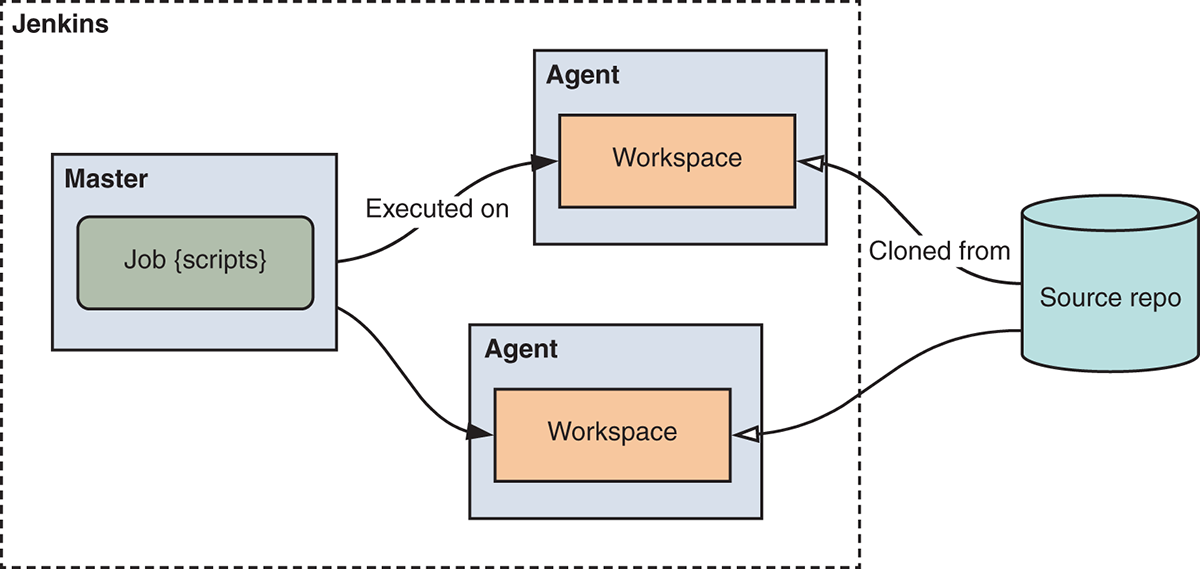
Figure 10.3 A Jenkins deployment consists of a master node, which manages execution, and agents that perform build tasks within a workspace — a clone of the repository being built.
Now that you have log data collected, you can explore it using Kibana. Clicking on the Discover section on the left side of Kibana’s web dashboard will take you to a page where you can perform searches. In the search box, insert the request UUID you received as the sell order response. In the case of this example, you’d be using
e11f4713-8bd8-4882-b645-55f96d220e44as your search parameter. In the next section, we’ll show you how to use Kibana to follow the execution of a sell request through the different services involved.