concept host in category microservice

This is an excerpt from Manning's book Microservices Security in Action.
\> docker run -it --net host --pid host \
--cap-add audit_control -v /var/lib:/var/lib \
-v /var/run/docker.sock:/var/run/docker.sock \
-v /etc:/etc --label docker_bench_security \
docker/docker-bench-security

# ---------------------------------------------------------------------------
# Docker Bench for Security v1.3.0
#
# Docker, Inc. (c) 2015-
#
# Checks for dozens of common best practices around deploying Docker
containers in production.
# Inspired by the CIS Docker 1.13 Benchmark.
# ---------------------------------------------------------------------------
[INFO] 1 - Host Configuration
[WARN] 1.1  - Create a separate partition for containers
[INFO] 1.2  - Harden the container host
[PASS] 1.3  - Keep Docker up to date

[INFO] 2 - Docker Daemon Configuration
[WARN] 2.1  - Restrict network traffic between containers
[PASS] 2.2  - Set the logging level
[PASS] 2.3  - Allow Docker to make changes to iptables

[INFO] 3 - Docker Daemon Configuration Files
[INFO] 3.1  - Verify that docker.service file ownership is
set to root:root
[INFO]      * File not found
[INFO] 3.2  - Verify that docker.service file permissions
are set to 644 or more restrictive
[INFO]      * File not found

[INFO] 4 - Container Images and Build Files
[WARN] 4.1  - Create a user for the container
[WARN]      * Running as root: affectionate_lichterman
[INFO] 4.2  - Use trusted base images for containers

[INFO] 5 - Container Runtime
[WARN] 5.1  - Do not disable AppArmor Profile
[WARN]      * No AppArmorProfile Found: affectionate_lichterman
[WARN] 5.2  - Verify SELinux security options, if applicable

[INFO] 6 - Docker Security Operations
[INFO] 6.1  - Perform regular security audits of your
host system and containers
[INFO] 6.2  - Monitor Docker containers usage, performance
and metering
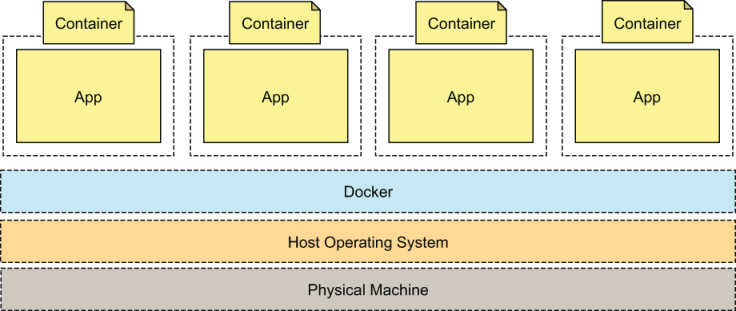
Unlike in a VM, a container doesn’t carry its own guest operating system; rather, it shares the operating system kernel with the host. Figure E.3 shows that the containers with the applications run on a Docker layer. But in reality, there’s no Docker layer, as the container itself is a construct of the Linux operating system. The containers run on the kernel itself.

This is an excerpt from Manning's book Microservices in Action.
Our experience suggests the best tools for this job are containers. A container is an operating system-level virtualization method that supports running isolated systems on a host, each with its own network and process space, sharing the same kernel. A container is quicker to build and quicker to start up than a virtual machine (seconds, rather than minutes). You can run multiple containers on one machine, which simplifies local development and can help to optimize resource usage in cloud environments.
Listing 7.5 microservices-in-action/chapter-7/feature/fees/app.py
import json
import datetime
from nameko.events import EventDispatcher, event_handler
from statsd import StatsClient    #1

class FeesService:
    name = "fees_service"
    statsd = StatsClient('statsd-agent', 8125,
 prefix='simplebank-demo.fees')    #2

    @event_handler("market_service", "order_placed")
 @statsd.timer('charge_fee')    #3
    def charge_fee(self, payload):
        print("[{}] {} received order_placed event ... charging fee".format(
            payload, self.name))

#1   Imports the StatsD client so you can use it in the module
#2   Configures the StatsD client by passing the host, the port, and the prefix you’ll use for all the emitted merics
#3   Using this annotation enables you to collect the time it takes for the 'charge_fee' function to run. The StatsD library uses the value passed as an argument for the annotation as the metric name. In this case, the charge_fee function will emit the metric named 'simplebank-demo.fees.charge_fee'; the prefix you configured before will be prepended to the metric name passed to the annotation.
8.5.2 Multiple static services per host
It’s possible to run multiple services per host (figure 8.16). In the static variant of this model, the allocation of services to hosts is manual and static; the service owner makes a conscious choice, predeployment, about where each service should be run.
At first glance, this approach might seem desirable. If obtaining new hosts is costly or hosts are scarce, then the easiest route to production would be to maximize usage of your existing, limited number of hosts.
But this approach has several weaknesses. It increases coupling between services: deploying multiple services to a host leads to coupling between services, eliminating your desire to release services independently. It also increases the complexity of dependency management: if one service needs package v1.1, but another needs v2.0, the difference is difficult to reconcile. It becomes unclear which service ownsthe deployment environment — and therefore which team has responsibility for managing that configuration.