concept Kubernetes cluster in category microservice

This is an excerpt from Manning's book Bootstrapping Microservices with Docker, Kubernetes and Terraform.
You might even consider using the techniques in this book to bootstrap your monolith as a single service within a Kubernetes cluster. Now you have the best of both worlds! When the time comes to decompose to microservices, you are already in the best possible position to do so and at your leisure, you can start chipping microservices off the monolith. And with the ease of automated deployment that modern tooling offers it is easy to tear down and recreate your application or create replica environments for development and testing. So if you want or need to create a monolith first you can still benefit from the techniques and technologies presented in this book.
In this chapter and the next, we will create a Kubernetes cluster and deploy multiple containers to it. We’ll deploy a MongoDB database server and a RabbitMQ server. Then we’ll learn how to deploy our video streaming microservice. In the next chapter, we’ll also build a continuous delivery pipeline that will automatically push our code updates to production.

Listing 6.7 - Container registry configuration with variables (extract from chapter-6/example-3/scripts/container-registry.tf)
resource "azurerm_container_registry" "container_registry" {
  name = var.app_name #A
  resource_group_name = azurerm_resource_group.flixtube.name
  location = var.location #B
  admin_enabled = true
  sku = "Basic"
}

... code omitted here ...

This is an excerpt from Manning's book Microservices Security in Action.
In this section, we create a Deployment in Kubernetes for the STS that we defined in the YAML file in the above listing. We assume you have access to a Kubernetes cluster. If not, follow the instructions in appendix J, section J.5, to create a Kubernetes cluster with the GKE.1 Once you have access to a Kubernetes cluster, go to the chapter11/sample01 directory and run the following command from your local machine to create a Deployment for STS:
Kubernetes follows the client-server architecture. A Kubernetes cluster consists of one or more master nodes and one or more worker nodes (see figure J.1). When we want to deploy a microservice in a Kubernetes environment, we directly interact with a Kubernetes master node, which is also known as the Kubernetes control plane. To connect to the Kubernetes master node, we have to run a Kubernetes client on our local machine; that’s the third component in a Kubernetes environment (in addition to the master nodes and the worker nodes).
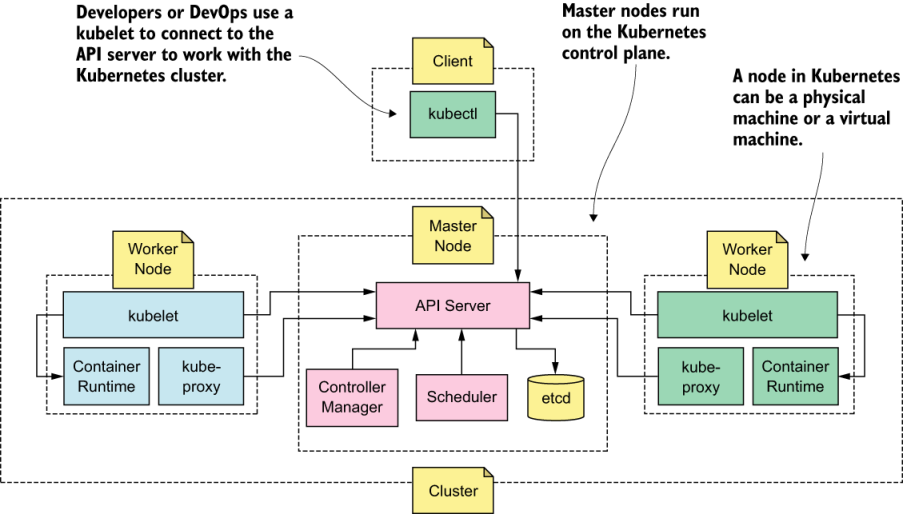
A node in Kubernetes is a VM or a physical machine in a cluster. In other words, a Kubernetes cluster is a collection of Kubernetes nodes. When we instruct the Kubernetes master node to create a Pod with one or more containers, it picks the most appropriate worker node and instructs it to run the Pod.
A given Kubernetes cluster has multiple nodes, but all the containers in a given Pod run in the same worker node. We can also instruct the Kubernetes master node to create multiple replicas of the same Pod, and in that case, these replicas could run on different nodes of the Kubernetes cluster. But still, for a given Pod, all its containers run in the same node.