concept datum in category mongoDB

This is an excerpt from Manning's book Getting MEAN with Mongo, Express, Angular, and Node.js 2ED.
In both approaches—one-way and two-way binding—step 1 is similar. You use the data to generate some HTML markup for the end user to see. Step 2 is where things get a bit different.
In step 2, you want to let the user enter some text in a form field to filter the list of data being displayed. With one-way data binding, you have to add event listeners to the form input field manually to capture the data and update the data model (to ultimately change what’s displayed to the user).
You’ll start by looking at the rules of a REST API. We’ll discuss the importance of defining the URL structure properly, the different request methods (GET, POST, PUT, and DELETE) that should be used for different actions, and how an API should respond with data and an appropriate HTTP status code. When you have that knowledge under your belt, you’ll move on to building your API for Loc8r, covering all the typical CRUD operations. We’ll discuss Mongoose along the way and get into some Node programming and more Express routing.
Your API should return a consistent data format. Typical formats for a REST API are XML and/or JSON. You’ll use JSON for your API, because it’s the natural fit for the MEAN stack. MongoDB outputs JSON, which Node and Angular can both natively understand. JSON is, after all, the JavaScript way of transporting data. JSON is also more compact than XML, so it can help speed the response times and efficiency of an API by reducing the bandwidth required.
Listing 7.5. Updating the renderHomepage function to use the data from the API
const renderHomepage = (req, res, responseBody) => {             #1
  res.render('locations-list', {
    title: 'Loc8r - find a place to work with wifi',
    pageHeader: {
      title: 'Loc8r',
      strapline: 'Find places to work with wifi near you!'
    },
    sidebar: "Looking for wifi and a seat? Loc8r helps you find places
     to work when out and about. Perhaps with coffee, cake or a pint?
     Let Loc8r help you find the place you're looking for.",
    locations: responseBody                                      #2
  });
};
This is an excerpt from Manning's book MongoDB in Action, Second Edition: Covers MongoDB version 3.0.
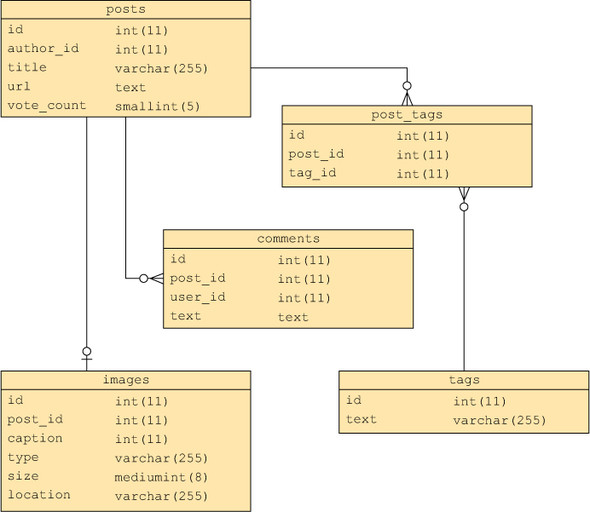
Let’s take a moment to compare MongoDB collections to a standard relational database representation of the same data. Figure 1.1 shows a likely relational analog. Because tables are essentially flat, representing the various one-to-many relationships in your post document requires multiple tables. You start with a posts table containing the core information for each post. Then you create three other tables, each of which includes a field, post_id, referencing the original post. The technique of separating an object’s data into multiple tables like this is known as normalization. A normalized data set, among other things, ensures that each unit of data is represented in one place only.
Figure 1.1. A basic relational data model for entries on a social news site. The line terminator that looks like a cross represents a one-to-one relationship, so there’s only one row from the images table associated with a row from the posts table. The line terminator that branches apart represents a one-to-many relationship, so there can be many rows in the comments table associated with a row from the posts table.
But strict normalization isn’t without its costs. Notably, some assembly is required. To display the post you just referenced, you’ll need to perform a join between the post and comments tables. Ultimately, the question of whether strict normalization is required depends on the kind of data you’re modeling, and chapter 4 will have much more to say about the topic. What’s important to note here is that a document-oriented data model naturally represents data in an aggregate form, allowing you to work with an object holistically: all the data representing a post, from comments to tags, can be fitted into a single database object.
These three sections will give you a basic working knowledge of sharding, but you won’t fully understand how these ideas all come together until you set up your own sharded cluster. That’s what you’ll do in the fourth section, where you’ll build a sample cluster to host data from a massive Google Docs–like application.
The picture has definitely changed. As you can see in figure 12.4, you now have 10 chunks. Naturally, each chunk represents a contiguous range of data.