concept file in category mule

This is an excerpt from Manning's book Mule in Action, Second Edition.
Now let’s set up a local ActiveMQ instance that you can use to test with. Download ActiveMQ (http://activemq.apache.org/download-archives.html; we tested with version 5.5.1), uncompress the file, navigate into the bin directory, and then run activemq start.
Always consider using the file transport in conjunction with FTP inbound endpoints. While you can stream FTP data through a flow, issues can arise if the files are large. Some FTP servers, for instance, have aggressive timeouts that can bite you if you’re processing many files as you download them. A better option is to send the FTP files to a file outbound endpoint, and perform your processing from there.
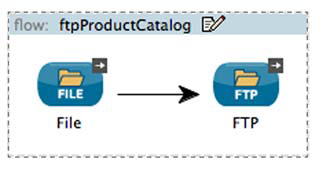
Sometimes you’ll need to send a file to a remote FTP server. The same retailer as in the last example has requested that Prancing Donkey send a subset of their product catalog periodically via FTP. To facilitate this, Prancing Donkey has set up a shared folder to drop these files into that Mule will poll and periodically send over FTP, illustrated in the next listing (see figure 3.17).
The file inbound endpoint is configured at
. As files are placed into the ./data/in directory, they’ll be passed to the FTP outbound endpoint
. This will place the file into the /data/prancingdonkey/catalog directory of the FTP server.
You just saw how to configure Mule to poll and submit files via FTP. We’ll now take a look at how you can use the JDBC transport to get data into and out of a database.