concept memory in category mule

This is an excerpt from Manning's book Mule in Action, Second Edition.
Listing 3.27 demonstrates a queue profile configuration that turns off persistence (all messages kept in memory) and limits the number of messages to 1000. Turning off persistence can be useful if you can tolerate message loss and are interested in maximizing throughput over the VM queues.
In this section, we’ll take a look at how to use Spring Security’s security managers and security providers to secure your Mule services. We’ll examine authenticating users against in-memory and LDAP user databases. Spring Security, formerly known as Acegi Security, is the officially supported security product of the Spring Portfolio. Using Spring Security with Mule follows the pattern we described previously. After defining your Spring Security configuration, which you’ll see how to do shortly, you define Mule Spring Security providers and managers that can be used on your endpoints.
Mule uses the security manager to broker authentication to the security provider and the back-end security resource, such as a database of user accounts or an LDAP directory. A bit confusingly, Mule’s Spring Security provider delegates to a Spring Security manager. The Spring Security manager then delegates to back-end authentication schemes, such as LDAP or an in-memory database of usernames. Figure 10.1 illustrates this relationship.
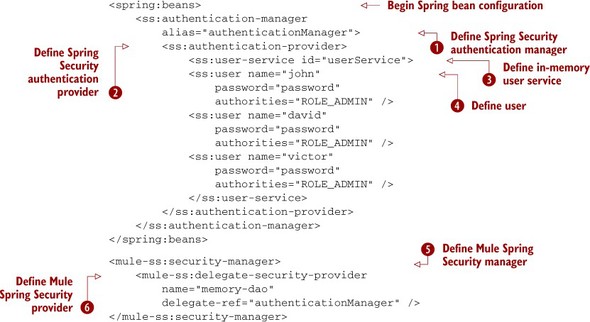
For simple applications, testing, and experimentation, it can be useful to use a static database for user information. Spring Security provides such a mechanism through its user-service. The user-service maintains a static map of users, passwords, and roles in memory. Listing 10.1 demonstrates configuring the user-service, along with a Spring Security manager and provider.
The Mule Spring Security manager is defined at
. The security provider is then configured
to delegate to the Spring Security manager defined at
. The manager will implicitly use the Spring Security authentication-provider defined at
, which is configured with an in-memory user-service
. The definitions for the user-service start at
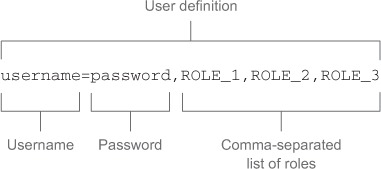
. The format used to define a user is shown in figure 10.2.
Although the in-memory user-service is a powerful tool for testing and simple authentication, you’ll likely be facing more complex authentication schemes in your environment. One such authentication scheme is provided by an LDAP directory, such as OpenLDAP, Apache Directory Server, or Microsoft’s Active Directory. Let’s look at how to use Spring Security’s LDAP support to authenticate against an LDAP directory.
Listing 12.27. A test configuration file with in-memory transports and service stubs
<spring:beans> <spring-jdbc:embedded-database id="jdbcDataSource" type="HSQL"> <spring-jdbc:script location="classpath:test-ddl.sql" /> </spring-jdbc:embedded-database> </spring:beans> <http:endpoint name="acmeApiEndpoint" address="http://localhost:${port}/api" exchange-pattern="request-response" /> <flow name="acmeApiStub"> <inbound-endpoint ref="acmeApiEndpoint" /> <object-to-string-transformer /> <test:component> <test:return-data>{"result":"success"}</test:return-data> </test:component> </flow>