concept app in category nativescript
This is an excerpt from Manning's book NativeScript in Action.
In the early days of mobile apps (pre-iPhone), not much emphasis was placed on methodologies for writing code once and deploying it to multiple platforms. Developers just wanted to get an app out to the Apple or Google Play stores as fast as possible. And if that meant their app didn’t support both platforms, that was a reasonable sacrifice.
Fast forward to today: the mobile world is continually changing, making it more and more difficult to keep up with the latest devices. As developers create app, they need to reach the largest audience possible: focusing on a single platform just isn’t an option anymore. Apps need to be available across platforms and devices. To keep up with ever-changing environment, developers are placing a premium on any technology that enables them to simplify the mobile app development process.
Listing 7.4 Additions to the app.css file to change the app’s background color to a shade of light grey
Page { background-color: #FFEFEF; }
You may recall the app Mike created for his sons, called My Robot, which had an app id of com.brosteins.myrobot. The Pet Scrapbook’s app id is com.brosteins.petscrapbook.
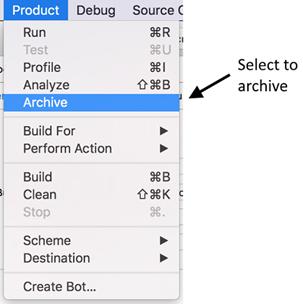
Creating an archive is like building an app. From the Product menu, select the Archive option (figure 14.36).
Figure 14.36 To create an app archive, select the Archive option from the Product menu.
When archiving an app, Xcode first re-builds the app, creates an archive, then opens the Organizer window (figure 14.37).