concept app_resource folder in category nativescript
This is an excerpt from Manning's book NativeScript in Action.
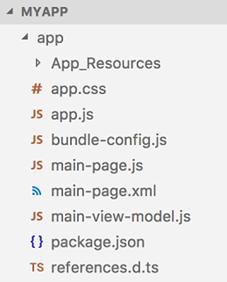
Inside of the app folder you’ll find the App_Resources folder, several files named app.<extension>, bundle-config.js, main-page.<extension>, main-view-model.js, another package.json file, and a file named references.d.ts.
Figure 3.8 The app folder contains a folder named App_Resources, several files named app.js, app.css, main-page.xml, main-page.js, main-view-model.js, package.json, and references.d.ts.
Let’s start by looking at the App_Resources folder.
12.1 Customizing Android apps with the App_Resources folder
Let’s take a brief journey back to chapter 3, where you learned about the structure of a NativeScript app. You’ll recall the App_Resources folder is a special folder holding platform-specific customizations. When we first introduced this to you, we said we’d come back to it later. That time has come.
Customizations (like app icons and launch screens) are done by updating files in the App_Resources folder. There’s a lot going on under this folder, so let’s take a closer look (figure 12.1).
Figure 12.1 The App_Resources/Android folder contains files and folders that can be updated to configure Android-specific app settings.
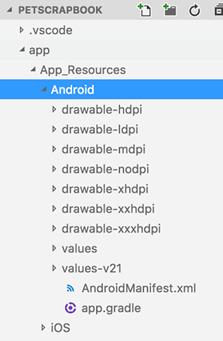
Figure 12.1 shows are two subfolders beneath the App_Resources folder: Android and iOS. These two folders house platform-specific files for Android and iOS respectively. In this chapter, we’ll be focusing on the Android folder. If you’re interested in learning about the iOS folder, check out the next two chapters.