concept camera in category nativescript
This is an excerpt from Manning's book NativeScript in Action.
While you’re learning to create professional apps, you’ll discover how NativeScript apps are structured and how to access native hardware components such as the camera, GPS, and location services.
In this chapter, you will learn about the core module APIs you can use to interact with the most common native hardware components of mobile devices: the file system, GPS, and camera. We’ll start by updating the Pet Scrapbook app to use the file system of a device, so users of the app can save the scrapbook pages that they make. After this change, we’ll continue to update the Pet Scrapbook to take and save pictures. Finally, you’ll learn how to use the GPS to capture the location where your picture was taken.
Listing 9.11 Add image button tap event handler added to scrapbookUpdate-page.js
var camera = require("nativescript-camera"); #1 var image = require("image-source"); #1 exports.onAddImageTap = function (args) { var page = args.object; var scrapbookPage = page.bindingContext; camera.requestPermissions(); #2 camera .takePicture() #3 .then(function (picture) { #4 image.fromAsset(picture).then(function (imageSource) { #5 scrapbookPage.set("image", imageSource); #5 }); }); } #1 Importing the nativescript-camera module and image-source module is the same as any core module #2 To use the camera you need to request permission #3 takePicture() returns a promise #4 When the promise resolves, the then() function is called, passing the picture #5 Create an image source object to bind to the viewAs we’ve mentioned, using the camera module is straightforward, but there are a few items we want to point out. Before taking a picture with the camera, you’ll need to ask the mobile device if it’s okay to use the camera by calling the
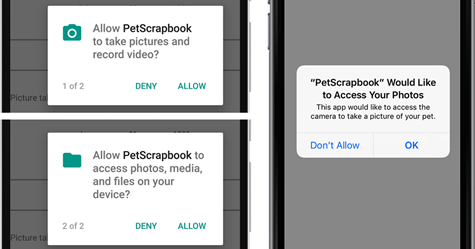
requestPermissions()function. When this method is called, the mobile device will prompt the user to grant access to use the camera. Figure 9.7 shows the different messages on Android and iOS.Figure 9.7 Android (left) and iOS (right) requesting permission to access the camera and photos.