concept datum in category nativescript
This is an excerpt from Manning's book NativeScript in Action.
When you write NativeScript apps, your code has 3 parts: JavaScript, XML, and CSS. The JavaScript component runs business logic, accesses data, or controls the flow of the app. The XML portion defines the user interface (UI), and CSS is used to style the UI, much like an HTML application.
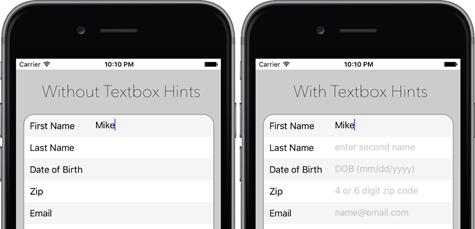
Figure 5.13 Comparison of two pages with and without a hint. The page on the left does not have hints, and the page on the right does. Hints provide context to users on what type (or format) of data you’d like entered into a textbox.
In NativeScript-with-Angular apps, you don’t need to use the data/observable or data/observable-array core module because Angular is smart. When you bind to a public property of a class (like the pages property), observable-like behavior gets built into the property automatically. And the best part is you don’t need to do anything special. Cool, right?
Listing 17.7 The list.component.ts file with the onAddTap() function defined
import { Component, OnInit } from "@angular/core"; import { Page } from "../../models/page"; import { RouterExtensions } from "nativescript-angular/router"; import { NavigationOptions } from "nativescript-angular/router/ns-location-strategy"; #1 import { PageService } from "../../services/page.service"; @Component({ selector: "list", providers: [ PageService ], templateUrl: "views/list/list.html", styleUrls: ["views/list/list.css"] }) export class ListComponent implements OnInit { public pages: Array<Page>; constructor( private routerExtensions: RouterExtensions, private pageService: PageService) { } ngOnInit(): void { this.pages = this.pageService.getPages(); } onAddTap(): void { let options: NavigationOptions = { #1 clearHistory: true #1 }; #1 this.routerExtensions.navigate( ["detail", this.pages.length], #2 options); } } #1 NavigationOptions class is needed to clear navigation history #2 To pass data between pages, include it in the routing array as an additional valueAdding the onAddTap() function is straightforward, but you’ll notice something new going on inside of the navigate() function: a second value in the routing array. To pass data between components, you can include any number of additional values in the routing array. The first value,
"detail",is the route we’re navigating to. Any subsequent values (likethis.pages.length) are appended to the route and passed to the destination component.