concept location in category nativescript
This is an excerpt from Manning's book NativeScript in Action.
Because NativeScript layouts are UI elements, they are defined in XML. Although I call layouts a UI element, they are not displayed on a mobile device’s screen when a page is loaded. Instead, they affect the location and arrangement of UI elements placed within the layout. Because layouts will contain other UI elements, they are referred to as layout containers.
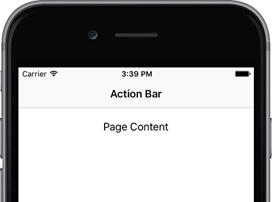
Figure 8.17 The common layout of a mobile app showcasing the location of an action bar versus the content of a page.
In this chapter, you will learn about the core module APIs you can use to interact with the most common native hardware components of mobile devices: the file system, GPS, and camera. We’ll start by updating the Pet Scrapbook app to use the file system of a device, so users of the app can save the scrapbook pages that they make. After this change, we’ll continue to update the Pet Scrapbook to take and save pictures. Finally, you’ll learn how to use the GPS to capture the location where your picture was taken.
Listing 17.7 The list.component.ts file with the onAddTap() function defined
import { Component, OnInit } from "@angular/core"; import { Page } from "../../models/page"; import { RouterExtensions } from "nativescript-angular/router"; import { NavigationOptions } from "nativescript-angular/router/ns-location-strategy"; #1 import { PageService } from "../../services/page.service"; @Component({ selector: "list", providers: [ PageService ], templateUrl: "views/list/list.html", styleUrls: ["views/list/list.css"] }) export class ListComponent implements OnInit { public pages: Array<Page>; constructor( private routerExtensions: RouterExtensions, private pageService: PageService) { } ngOnInit(): void { this.pages = this.pageService.getPages(); } onAddTap(): void { let options: NavigationOptions = { #1 clearHistory: true #1 }; #1 this.routerExtensions.navigate( ["detail", this.pages.length], #2 options); } } #1 NavigationOptions class is needed to clear navigation history #2 To pass data between pages, include it in the routing array as an additional value