concept modal dialog in category nativescript
This is an excerpt from Manning's book NativeScript in Action.
Modal dialogs are a UI design concept where a user’s interaction on a page prompts the UI to temporarily display a second page on top of the first page. When the user completes their interaction with the second page, it disappears and the UI is redirected to the first page. This UI interaction pattern (and the second page that is displayed) is referred to as a modal dialog because the second page often contains a dialog box or other UI element that is too big to fit on the first page.
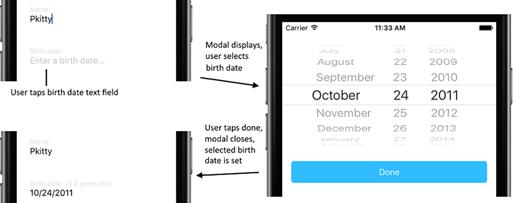
The goal of these changes is to create a less-complex UI that can fit on to the screen without the need for scrolling. To support the use of modals, the user’s workflow and page navigation will change. Instead of using the date picker and list picker directly on the update page, the user will tap a text field to enter the birth date and gender. When the text fields are tapped, a modal dialog will appear, containing the birth date picker and gender list picker. When they have selected the desired values, the modal dialog is closed and the selected values are displayed on the update page. Figure 11.2 shows a preview of this workflow for the birth date picker.
Figure 11.2 A user’s interaction with the update page with modal dialogs used to select the birth date.