concept Pet Scrapbook in category nativescript
This is an excerpt from Manning's book NativeScript in Action.
So far, the Pet Scrapbook app isn’t much of a scrapbook because it only has a single scrapbook page and users can only enter information for a single pet. Let’s refactor the scrapbook so users can add information for multiple pets.
In the last several chapters, we’ve continued to refine the Pet Scrapbook app while teaching you about supporting multiple screen resolutions, using modals, and styling apps with themes. Now that we’ve finished adding features to the Pet Scrapbook, what’s next? Writing an app solely for the app’s sake isn’t our motivation: we aspire to share our work. And the best way to share is by publishing the Pet Scrapbook to the app stores.
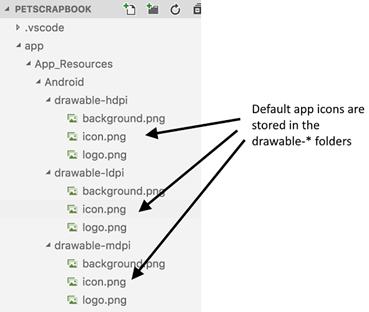
Figure 12.6 The default app icons of the Pet Scrapbook are named icon.png and stored inside the various drawable folders.
We’d like the Pet Scrapbook to run on as many devices as possible, which means that it needs to support multiple screen sizes. Let’s revisit the AndroidManifest.xml file and check out the supports-screens element (listing 12.3).
Listing 12.3 The AndroidManifest.xml file showing the default screen sizes that the Pet Scrapbook supports
<supports-screens android:smallScreens="true" #1 android:normalScreens="true" #2 android:largeScreens="true" #3 android:xlargeScreens="true"/> #4 #1 Support screens about 2 – 3 inches #2 Support screens about 2 – 5 inches #3 Support screens about 4 – 7 inches #4 Support screens about 7+ inches