concept tablet - specific page in category nativescript
appears as: tablet-specific pages, The tablet-specific page, tablet-specific page

This is an excerpt from Manning's book NativeScript in Action.
You may have wondered how you can test tablet-specific pages on the Android emulator and iOS simulator. Running and testing a NativeScript on a tablet emulator/simulator is no different than doing it on a phone-sized device. It may sound a bit over-simplified, but the only thing you need to do is run the tablet-sized device running instead of a phone-sized device.
Listing 11.12 Handling the loaded event in the scrapbook-page.land.minWH600.js file
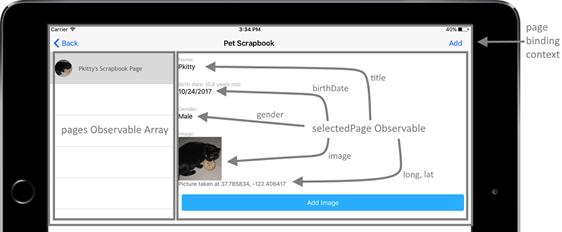
var observable = require("data/observable"); var observableArray = require("data/observable-array"); var fileSystemService = require("~/data/fileSystemService"); var page; exports.onLoaded = function(args) { page = args.object; var scrapbook = new observable.fromObject({ #1 pages: new observableArray.ObservableArray(), #1 selectedPage: null #1 }); #1 var pages = fileSystemService.fileSystemService.getPages(); #2 if (pages.length !== 0) { #2 pages.forEach(function (item) { #2 var model = scrapbookPageModel(); #2 model.id = item.id; #2 model.title = item.title; #2 model.gender = item.gender; #2 model.birthDate = item.birthDate; #2 model.image = item.image; #2 model.lat = item.lat; #2 model.long = item.long; #2 scrapbook.pages.push(model); #2 }); #2 } #2 page.bindingContext = scrapbook; #3 }; function scrapbookPageModel(id){ #4 var model = new observable.fromObject({ id: id, title: null, birthDate: null, gender: null, image: null, lat: null, long: null }); model.calcAge = function(birthDate) { var now = Date.now(); var diff = Math.abs(now - birthDate) / 1000 / 31536000; return diff.toFixed(1); }; return model; } #1 The definition of the observable is new for the tablet-specific page, tracking the collection of pages and the selected page #2 This is almost identical, except the scrapbook pages are pushed to the scrapbook.pages observable array #3 Because the page contains both a list of all pages and the selected page, the binding context is set to the over-arching observable #4 No changes here
Figure 11.12 The tablet-specific page showing the binding context and how observables should bind to each UI element area