concept tns in category nativescript
This is an excerpt from Manning's book NativeScript in Action.
You use the NativeScript CLI by invoking the
tns <sub-command>command from your favorite terminal or command line window.
tns run ios --emulator tns run android --emulator
tns build ios tns build androidThe
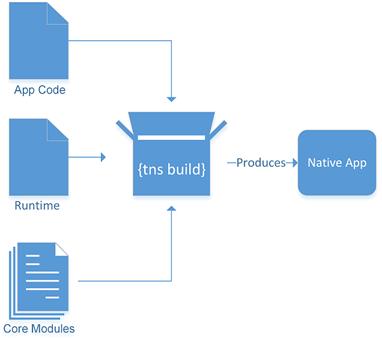
tnsbuildcommand packages your app code, the NativeScript runtime, and core modules into the native app (figure 2.11).Figure 2.11 The tns build command bundles your app code, the NativeScript runtime, and the core modules into a native app
Every time that you build your app, whether it is through the
tns buildortnsruncommand, the NativeScript CLI takes your app code, along with the NativeScript runtime and core modules, and packages it into a native app for Android or iOS. At this point you may be thinking that this seems like a lot of work and that you are wasting a lot of time building, running, waiting for the emulator to launch, and so on. If you were thinking that, you are correct: it can take a lot of time, especially if you have a large app. So, let me introduce you to a better way: livesync.