concept UI in category nativescript
appears as: UI, UI

This is an excerpt from Manning's book NativeScript in Action.
When you write NativeScript apps, your code has 3 parts: JavaScript, XML, and CSS. The JavaScript component runs business logic, accesses data, or controls the flow of the app. The XML portion defines the user interface (UI), and CSS is used to style the UI, much like an HTML application.
Listing 4.7 Implementation of the onTap function in the home.js file
var frameModule = require("ui/frame"); #1 function onTap() { frameModule.topmost().navigate("views/about/about "); #2 } exports.onTap = onTap; #3 #1 Get a reference to the NativeScript frame module which is used for navigation #2 Use the frame module to navigate to the About page #3 The function must be exported so the NativeScript runtime can access it from the UI
In the last chapter, you learned how NativeScript themes can make your apps look more professional with a minimal amount of effort. Using the Pet Scrapbook as an example, we styled the home, scrapbook list, and update pages with the built-in light color scheme. Even though the app has started to look more professional, the UI and functionality of the update page is clunky.
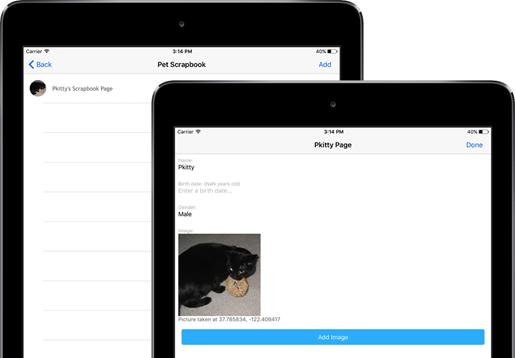
Figure 11.7 The Pet Scrapbook running on an iPad, note the large amount of unused space in the UI.