concept build server in category .net

This is an excerpt from Manning's book Continuous Integration in .NET.
In the CI script, you verify that the work area on the build server is set up correctly
. The original source file is compared to the file in the work area. If it’s different, it’s copied to the work area. To detect the differences, you can use the fc.exe tool that comes with Windows, which compares two text files, prints the differences on screen, and redirects the output of the command to the null device to hide it from the user. The new work-area source file is then compiled into an .exe and tested
. To test the application, the script uses a little fake: it outputs 0 if the strings are identical. This is because you have to check the error level in the batch file. If the program returns something bigger than 0, you’ll assume it’s an error. If the test is successful, the .exe is copied to the deploy folder. The feedback mechanism is also updated with the result.
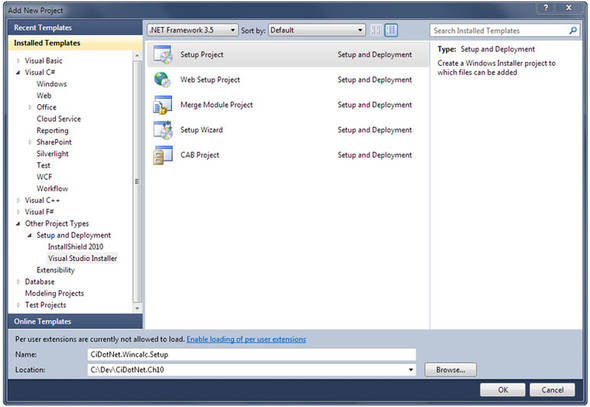
The easiest way to create the installation package is to use built-in Visual Studio features. If you want to do it and eventually incorporate the installation package creation into your CI process, you have keep in mind that you’ll need to install Visual Studio on the build server. We’ll deal with this issue in a moment. But first, let’s make the setup project. Open the solution where you have the Windows version of the financial calculator. Right-click the solution, choose Add > New Project, select Other Project Types > Setup and Deployment > Visual Studio Installer, and choose Setup Project (see figure 10.1).