concept conversation in category .net

This is an excerpt from Manning's book NHibernate in Action.
When users work on applications, they perform distinct unitary operations. These operations can be referred to as conversations (or business transactions or application transactions). For example, placing a bid on an item is a conversation. Seasoned programmers know how hard it can be to make sure that many related operations performed by the user are treated as if they were a single bigger business transaction (a unit). You’ll learn in this section that NHibernate makes this easier to achieve. Let’s take another example to illustrate this concept.
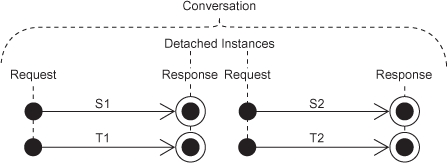
The conversation is auction approval, which spans two user requests (and possibly many web requests over many days). First, the administrator selects a pending item to view its details; second, the administrator approves the auction, moving the item to the Active state. The second request must perform a version check to verify that the item hasn’t been updated or approved since it was retrieved for display.
Listing 10.6. NHibernateConversationWebModule for conversations
public class NHibernateConversationWebModule : IHttpModule { const string NHibernateSessionKey = "NHiA.NHibernateSession"; const string EndOfConversationKey = "NHiA.EndOfConversation"; public static void EndConversationAtTheEndOfThisRequest() { HttpContext.Current.Items[EndOfConversationKey] = true; } public void Init(HttpApplication context) { context.PreRequestHandlerExecute += new EventHandler(OnRequestBeginning); context.PostRequestHandlerExecute += new EventHandler(OnRequestEnding); } public void Dispose() { } private void OnRequestBeginning(object sender, EventArgs e) { ISession currentSession = (ISession)HttpContext.Current.Session[NHibernateSessionKey]; if (currentSession == null) { currentSession = NHibernateHelper.OpenSession(); currentSession.FlushMode = FlushMode.Never; } CurrentSessionContext.Bind(currentSession); currentSession.BeginTransaction(); ] private void OnRequestEnding(object sender, EventArgs e) { ISession currentSession = CurrentSessionContext.Unbind(NHibernateHelper.SessionFactory); if (HttpContext.Current.Items[EndOfConversationKey] != null) { currentSession.Flush(); currentSession.Transaction.Commit(); currentSession.Close(); HttpContext.Current.Session[NHibernateSessionKey] = null; } else { currentSession.Transaction.Commit(); HttpContext.Current.Session[NHibernateSessionKey] = currentSession; } } }Because you’ll be storing the NHibernate session in a map, you need a key
to define its location. Because the business logic is responsible for ending the conversation, it needs to call the EndConversationAtTheEndOfTheRequest() method
to set a value in the current context that will be used at the end of the request. The initialization of the module
registers events for the beginning and the end of requests. Note that you aren’t using the same events as in listing 11.5 because these let you access the ASP.NET session state.
When beginning a new request
, if a conversation is already running, you extract its detached NHibernate session from the ASP.NET session state
. Otherwise
, you start a new conversation by opening a new session. We’ll explain why you set its flush mode to never
in the next section. Once you have the NHibernate session of the running conversation, you bind it to the current context
and begin a new transaction. At this point, the conversation is ready to be used anywhere in this web request.
When the time comes to end the request
, you detach its NHibernate session from the current context
. If the value to end the conversation was set
, you manually flush the session
to process all the changes made in the conversation, you commit these changes, you close the session, and you then remove the NHibernate session from ASP.NET session state. If the conversation is suspended
, you commit the transaction to close its database connection, and you store the session in the ASP.NET session state. This conversation will resume when the next request starts.