concept model in category .net

This is an excerpt from Manning's book C# in Depth.
Inner joins are used all the time in SQL. They’re effectively the way that you navigate from one entity to a related one, usually joining a foreign key in one table to the primary key in another. In the object-oriented model, you tend to navigate from one object to another via references. For instance, retrieving the summary of a defect and the name of the user assigned to work on it would require a join in SQL—in C# you often just use a chain of properties. If you’d had a reverse association from Project to the list of NotificationSubscription objects associated with it in the model, you wouldn’t have needed the join to achieve the goal of this example, either. That’s not to say that inner joins aren’t sometimes useful within object-oriented models, but they don’t naturally occur as often as in relational models.
Before you start writing any queries, you need a database and a model to represent it in code.
This is an excerpt from Manning's book Entity Framework 4 in Action.
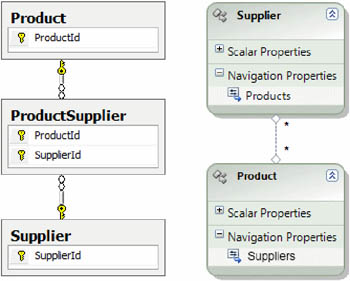
In a relational database, you can’t simply declare a Customer table and say that it inherits from another table. That isn’t how relational organization works. You can create a single table that contains both customer and supplier data, or create one for each type. Whatever your decision is, there will be a mismatch between database and model.
In the model, you have a Product class. A store can sell different types of products such as shoes, shirts, golf equipment, swimming equipment, and so on. All these products share some basic types of data, like price and color, and they’ll also have other information that’s specific to each product.
Even in this case, inheritance comes to your aid. To reflect this situation, you write a Product class, and then you create a class for each specific product. The biggest problem emerges when you design the OrderDetail class. In that class, you’ll need a property indicating what product the detail refers to; this property is of type Product even if at runtime the concrete instance of the object might be of type Shoes, Shirts, or any type that inherits from Product. Figure 1.8 shows this inheritance hierarchy in the model.
So far, you’ve learned how to create an application from scratch, defining a model, mapping it to the database, and performing queries on it. We also looked at creating and mapping classes using the Visual Studio designer, which hides a lot of complexity, making your life easier. But a strong knowledge of the Entity Data Model and the code in the model classes is fundamental to mastering Entity Framework. In this chapter, we’ll dig deep into both subjects so that you’ll be able to completely understand this aspect of Entity Framework. This chapter covers the mapping of tables or views to entities. Other features, like stored procedures and function mappings, will be discussed in later chapters.
string GetStoreNamespace(string sourcePath)
{
  ...
  return model.Attribute("Namespace").Value;
}
This is an excerpt from Manning's book DSLs in Boo: Domain-Specific Languages in .NET.
Model— This is the existing code base we reuse in our DSL (usually using a facade). The difference between the API and the model is that the model usually represents the notions in our application (such as Customer, Discount, and so on), whereas the API focuses on providing the DSL with convenient ways to access and manipulate the model.
But syntax is a small part of versioning a DSL. The model, API, behavior, and application integration are all parts of the versioning story, and they all require the versioning approach that’s outlined in this chapter.