concept MS Deploy in category .net

This is an excerpt from Manning's book Continuous Integration in .NET.
Microsoft Web Deployment Tool (MS Deploy) is a tool that provides support for deployment, synchronization, and migration to a newer IIS version. It can do a lot more than you’ll get to know here. We’ll deal with the deployment part of MS Deploy. Visual Studio 2010 uses it under the hood to create so-called web packages. It’s nothing more than a compressed zip file containing everything necessary to create the application on the IIS server. The process of creating the package is called publishing. You’ll create a web package for the web edition of the finance calculator.
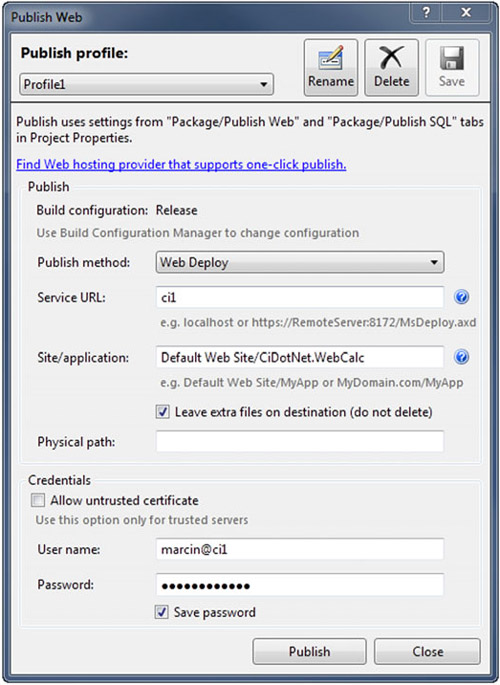
Visual Studio 2010 provides a nice UI for deployment. One of the options is Web Deploy (using MS Deploy); see figure 10.13 for details. Choose Web Deploy as the publishing method. Provide the service URL (if you use the default MS Deploy installation, you can provide only the server name; if not, enter the entire URL to the MS Deploy service). Enter the name of the site and application (for example, Default Web site/CiDotNet.WebCalc). You don’t have to delete the files prior to deployment and provide the physical path for the files. At the bottom, provide the credentials of the user who is allowed to use the deployment service.
Figure 10.13. Publishing the web application from Visual Studio 2010, made easy. Provide a URL to a server with MS Deploy installed. Give the application a name, and click Publish.
The Visual Studio 2010 publishing window, however nice, is useless in a CI scenario. Fortunately, the MS Deploy developers thought about automated deployment, too. Let’s look at how to incorporate MS Deploy into the CI process.