concept Order in category .net

This is an excerpt from Manning's book .NET Core in Action.
Table 5.5. Order table contains all the orders made to suppliers
Name
Data type
Description
Id int Unique order ID SupplierId int ID of the supplier to which this order was sent PartTypeId int The type of part ordered PartCount int Number of parts ordered PlacedDate date The date on which the order was placed FulfilledDate date The date the order was fulfilled Table 5.6. SendEmailCommand table contains commands to send order emails
Name
Data type
Description
Id int Unique ID for the email To varchar Email address to send to Subject varchar Subject line of email Body varchar Body of email The same single-threaded processor we use to update the inventory will create the orders. After processing all the PartCommand objects, it checks each item to see if the part count is below the threshold. If there are no outstanding orders for an item, it creates new records in the Order and SendEmailCommand tables. Another processor is responsible for sending the emails.
To determine if you have an outstanding order, add a property to Order that indicates if and when the order was fulfilled, as shown in the next listing.
Listing 5.32. Order class
using System;

namespace WidgetScmDataAccess
{
  public class Order
  {
    public int Id { get; set; }
    public int SupplierId { get; set; }
    public Supplier Supplier { get; set; }
    public int PartTypeId { get; set; }
    public PartType Part { get; set; }
    public int PartCount { get; set; }
    public DateTime PlacedDate { get; set; }
    public DateTime? FulfilledDate { get; set; }      #1
  }
}
This is an excerpt from Manning's book Entity Framework 4 in Action.
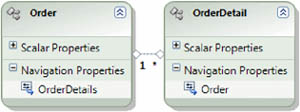
The Order class already has four properties for the shipping address, so adding further properties won’t be a problem. But although it works smoothly, these new properties let the class grow, making it harder to understand. What’s more, customers and suppliers have an address, the product store has an address, and maybe other classes have addresses too. Classes are reusable, so wouldn’t it be good to create an AddressInfo class and reuse it across the entire model?
POCO (plain old CLR object) classes lead to persistence ignorance (PI). PI allows the user to write code that only cares about the business problem without any infrastructure intrusion. The Order and OrderDetail classes know nothing about Entity Framework. The persistence engine could be a handwritten data layer, Entity Framework, NHibernate, or something else. What’s more, a clean separation between the object model classes and the persistence engine allows you to put the classes in the model assembly (the object model or domain model, depending on your architecture), leaving to the infrastructure or the data layer (again, depending on the architecture) the burden of persistence. More separation leads to more maintainability; more maintainability leads to better reactions to application changes and bugs; better reactions lead to happier customers and lower costs; and all of this leads to a great success.
Listing 5.7. Describing the Order and OrderDetail database tables
<EntityType Name="Order"> <Key> <PropertyRef Name="OrderId" /> </Key> <Property Name="OrderId" Type="int" StoreGeneratedPattern="Identity" Nullable="false" /> <Property Name="ShippingAddress" Type="nvarchar" Nullable="false" MaxLength="50" /> <Property Name="ShippingCity" Type="nvarchar" Nullable="false" MaxLength="50" /> <Property Name="ShippingZipCode" Type="nvarchar" Nullable="false" MaxLength="15" /> <Property Name="ShippingCountry" Type="nvarchar" Nullable="false" MaxLength="30" /> <Property Name="EstimatedShippingDate" Type="datetime" Nullable="false"/> <Property Name="ActualShippingDate" Type="datetime" Nullable="false" /> <Property Name="CustomerId" Type="int" Nullable="false" /> </EntityType> <EntityType Name="OrderDetail"> <Key> <PropertyRef Name="OrderDetailId" /> </Key> <Property Name="OrderDetailId" Type="int" StoreGeneratedPattern="Identity" Nullable="false" /> <Property Name="Quantity" Type="smallint" Nullable="false" /> <Property Name="UnitPrice" Type="decimal" Nullable="false" Precision="29" Scale="29" /> <Property Name="Discount" Type="decimal" Nullable="false" Precision="29" Scale="29" /> <Property Name="OrderId" Type="int" Nullable="false" /> <Property Name="ProductId" Type="int" Nullable="false" /> </EntityType>
The ordering process in OrderIT includes the Order and OrderDetail entities plus the AddressInfo complex type. Thanks to the POCO support, you can create such classes without worrying about persistence (as you’ll notice in listing 5.1). For now, let’s forget about associations. We’ll discuss them later.