concept run - time in category .net

This is an excerpt from Manning's book LINQ in Action.
Table 1.1. LINQ’s design goals and the motivations behind them
Goal
Motivation
Integrate objects, relational data, and XML Unified query syntax across data sources to avoid different languages for different data sources. Single model for processing all types of data regardless of source or in-memory representation. SQL and XQuery-like power in C# and VB Integrate querying abilities right into the programming languages. Extensibility model for languages Enable implementation for other programming languages. Extensibility model for multiple data sources Be able to access other data sources than relational databases or XML documents. Allow other frameworks to enable LINQ support for their own needs. Type safety Compile-time type checking to avoid problems that were previously discovered at run-time only. The compiler will catch errors in your queries. Extensive IntelliSense support (enabled by strong-typing) Assist developers when writing queries to improve productivity and to help them get up to speed with the new syntax. The editor will guide you when writing queries. Debugger support Allow developers to debug LINQ queries step by step and with rich debugging information. Build on the foundations laid in C# 1.0 and 2.0, VB.NET 7.0 and 8.0 Reuse the rich features that have been implemented in the previous versions of the languages. Run on the .NET 2.0 CLR Avoid requiring a new runtime and creating unnecessary deployment hassles. Remain 100% backward compatible Be able to use standard and generic collections, data binding, existing web and Windows Forms controls, and so on.
In the previous examples, we showed you how to create dynamic queries. These queries are dynamic because some of the values they use or even the clauses that make them are not decided at compile-time, but at run-time. The information these queries are based on is not available when the code is written because it can depend on the user or on the context. In more advanced scenarios, you may have to completely create queries on the fly. Imagine that your application needs to query data based on a description coming from an XML file, a remote application, or the user. In these cases, it’s possible to rely on expression trees.
This is a typical query completely defined at compile-time. However, if the XML is provided to our application at run-time, we cannot write the query this way because the application is already compiled. The solution is to use expression trees.
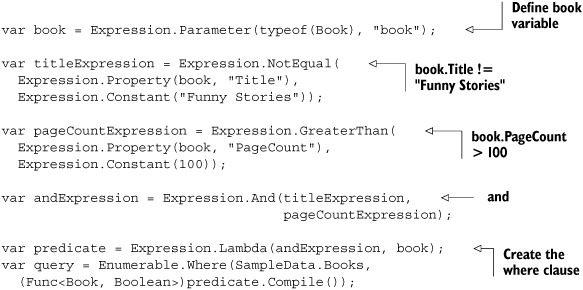
As you’ve seen in chapter 3, the simplest way to create an expression tree is to let the compiler convert a lambda expression declared with the Expression<TDelegate> class into a series of factory method calls that will build the expression tree at run-time. In order to create dynamic queries, you can take advantage of another way of working with expression trees. You can “roll your own” expression tree by calling the factory methods—they’re static methods on the Expression<TDelegate> class—and compile the expression tree into a lambda expression at run-time.
Listing 5.17 dynamically creates a query at run-time that is equivalent to the preceding query expression.