concept target in category .net

This is an excerpt from Manning's book ASP.NET AJAX in Action.
Table 10.1. Values assigned to the properties of the AutoCompleteExtender in the example
Property
Description
Value
ID ID of the extender control CountryAutoComplete TargetControlID ID of the target TextBox Country ServiceURL URL of the web service used to retrieve the list of suggestions CountryService.asmx ServiceMethod Name of the web method that returns the list of suggestions GetCountries MinimumPrefixLength Minimum number of characters needed to activate the auto-complete functionality 1
Have no fear: We’ll guide you through the process to successfully set up a drag-and-drop–enabled UI. The first step is to represent the draggable items and the drop targets with client components. These components encapsulate the logic needed to deal with the drag-and-drop engine. You associate them with the DOM elements involved in the drag-and-drop operation; so, we’ll use the terms draggable item and drop target to refer to the client components (either controls or behaviors) as well as to the associated DOM elements.
Figure 12.1. Draggable items and drop targets communicate with the DragDropManager to participate in a drag-and-drop operation.
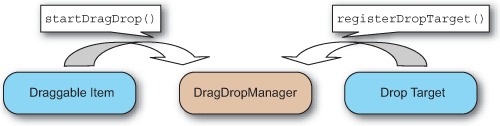
When the DragDropManager recognizes the draggable items and drop targets involved in drag and drop, it opens a communication channel with them. The purpose is to provide feedback about the progress of the operation. Receivers can use this feedback to determine the status of the operation and to enhance the user experience based on the current state. For example, a draggable item may want to display a semitransparent copy of the element being dragged, near the mouse pointer. A drop target may decide to highlight its area when an element is dragged over it.
To receive feedback from the DragDropManager, draggable items must implement the Sys.Preview.UI.IDragSource interface. Drop targets have to implement the Sys.Preview.UI.IDropTarget interface. Figure 12.2 shows the bidirectional communication established between the DragDropManager, draggable items, and drop targets.