concept XAML in category .net

This is an excerpt from Manning's book IronPython in Action.
Recently, a new user-interface library has been added to the .NET framework: WPF. This has a more sophisticated appearance[5] and some interesting integration with XAML and vector graphics, but has fewer controls and is less mature than Windows Forms. Windows Forms is still the standard for building business applications.
XAML is a declarative way of representing user interfaces in XML. XAML itself is extensible; following are several XAML variants:
Listing 9.2. Hello World user interface in XAML
<Window xmlns="http://schemas.microsoft.com/winfx/2006/xaml/presentation" xmlns:x="http://schemas.microsoft.com/winfx/2006/xaml" Title="Welcome to IronPython" Width="450" SizeToContent="Height"> <StackPanel Margin="15" x:Name="stackPanel"> <Button FontSize="24" x:Name="button"> <Button.BitmapEffect> <DropShadowBitmapEffect /> </Button.BitmapEffect> Push Me </Button> </StackPanel> </Window>
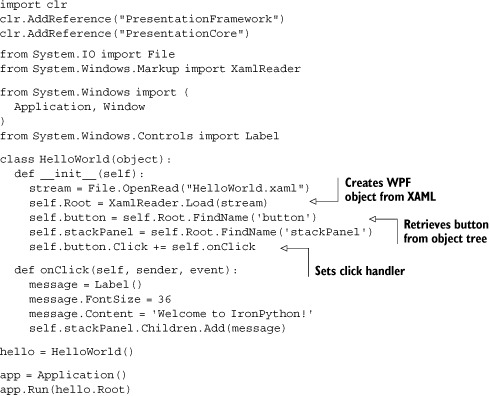
In this XAML example, you get access to the Button and the StackPanel by giving them a name using the x:Name attribute. They’re then retrieved from the object tree returned by XamlReader.Load using the FindName method. Listing 9.3 is the code that reads in the XAML and sets up the button event handler.
Because the XAML creates a Window, our HelloWorld class is no longer a window subclass itself. In fact, there’s no reason that the top-level element needs to be a window. You could make the StackPanel the top-level element and set the return value from XamlReader.Load as the Content on a Window subclass.
Given that you’re probably a programmer, why should you use XAML instead of code? One reason for considering XAML is for dynamic user interface creation. By using the XamlReader, you can read in interface definitions at runtime. Alternative layouts could be loaded in and swapped out in response to user actions, or even created dynamically through text manipulation.
There are other reasons for preferring XAML, as the following fragment illustrates:
<LinearGradientBrush>
 <LinearGradientBrush.GradientStops>
   <GradientStop Offset="0.00" Color="Yellow" />
   <GradientStop Offset="0.25" Color="Tomato" />
   <GradientStop Offset="0.75" Color="DeepSkyBlue" />
   <GradientStop Offset="1.00" Color="LimeGreen" />
 </LinearGradientBrush.GradientStops>
</LinearGradientBrush>
This XAML fragment creates a colored gradient brush used to create colorful backgrounds. The XAML is less verbose than the equivalent in code, even more so if you factor in the imports (and the time it takes to find the right namespaces to import everything from). More importantly, although XAML is quite easy to read and to write by hand, this kind of element is much easier to create with tools like Expression Blend.
Expression Blend allows you (or your designers) to create extremely rich interfaces with transitions, gradients, and animations. If Expression Blend is a designer’s tool, why is it of interest to developers? As well as designing full interfaces, you can also design individual components. You can copy and paste XAML from an Expression project into your code, and vice versa.
XAML generated by Expression Blend, or by the Visual Studio WPF designer, is intended to be compiled and used with code-behind. It will include an x:Class attribute valid only in compiled XAML. To make the XAML valid for consumption by the XamlReader, you’ll need to remove this attribute from the top-level element.