concept server in category nextjs

This is an excerpt from Manning's book Next.js in Action.
Our users will interact with a production build of our React application, served by a production server. The production build is different from the builds that are served to the browser by the dev server. For example, in production we don’t need to listen for new bundles being sent from the server. The bundles are compressed because the time taken to deliver the application to the user matters in this scenario, unlike during development. The compiler used to produce the production bundle might perform several other optimizations, like ensuring that any code that isn’t used by the app isn’t included in the build.
Static websites that predate the modern web were comprised mainly of HTML files and other resources that formed parts of those pages, like images and stylesheets. The browser would request a URL and the server would return content that was ready to display. Today, much of the content that we see on the web is generated dynamically. For example, React applications are made up of components that are implemented via JavaScript. Before any content can be displayed, a bunch of JavaScript needs to run. Often, data needs to be fetched from an API endpoint before any content is visible to the user. While we can do a lot more with modern technology, it comes at a cost. Static content that comes from the server, ready to display, means less wait time for the user and an overall better experience.
React components can be rendered on the server, resulting in static page content that can be sent directly to the browser. If you’ve ever used a dynamic server-side language before, like ASP.NET or PHP, server-side React is the same idea. The browser hits some URL in your application, and the code that lives at the URL generates static content. This content is then displayed by the browser as soon as it arrives – there’s no need to wait for JavaScript code to run in the browser to generate it.
Server-side React is rarely used on its own. Instead, React applications rely on components being rendered on the server and in the browser. Here’s an illustration that shows difference the two approaches:
Figure 1.2 Server-side rendering versus client-side rendering
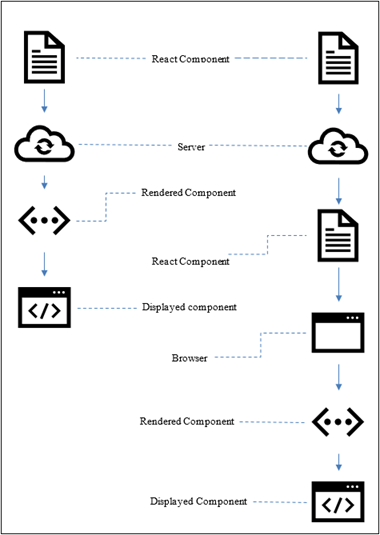
The left side shows what server-side rendering looks like. The React component is rendered by the server, resulting in static content. The content is then sent to the browser and displayed. The time between the response arriving at the client and the user seeing the component displayed on their screen is very short.
The right side of the illustration shows what browser rendering looks like for React components. The component is served to the client by the server as part of the JavaScript bundle for the application. Once the browser receives the code bundle, there is still no content visible to the user. This is because the browser needs to render the components, meaning that the time between everything arriving from the server and the user seeing something on their screen is longer.
React applications use both approaches. If we were to rely only on server-side rendering, we would end up putting unnecessary load on the server and transferring a lot of data over the network. If we only use browser rendering, then the user will have to wait longer before they’re able to see anything on their screen. Instead, we can render the content for the user on the sever when they first load the application so that they can see application content as soon as everything arrives from the server. Then, as the user interacts with the application, React components are rendered by the browser since all the application code is loaded and ready.
Listing 5.23: Styles rendered by the server and sent to the browser on initial page load
<style id="__jsx-73122009">
  button.jsx-73122009 {
    margin: 3px;
    padding: 5px;
    border-style: none;
  }
</style>
<style id="__jsx-2949259094">
  h2.jsx-2949259094 {
    margin-top: 5px;
    margin-bottom: 5px;
  }
  section.jsx-2949259094 {
    width: 300px;
    border: solid 1px;
    margin: 5px;
    padding: 3px;
  }
</style>