concept API in category node

This is an excerpt from Manning's book Getting MEAN with Mongo, Express, Angular, and Node.js 2ED.
This chapter is an exciting one! Here’s where you tie the front end to the back end for the first time. You’ll remove the hardcoded data from the controllers, and eventually show data from the database in the browser instead. You’ll also push data back from the browser into the database via the API, creating new subdocuments.
Seeing as you’re going to the effort of calling the API, the least you can do is use the data it’s sending back. You can handle the response more robustly later, but you’ll start with making the handler work. In order to make this happen, you’re going to assume that a response body is returned to the callback, and you can pass it straight into the renderHomepage() function, as highlighted in the following listing.
Listing 7.4. Updating the contents of the homelist controller to use the API response
  request(
    requestOptions,
    (err, response, body) => {
      renderHomepage(req, res, body);        #1
    }
  );
You coded the API, so you know that the response body returned by the API should be an array of locations. The renderHomepage() function needs an array of locations to send to the view, so try passing it straight through, making the changes highlighted in bold in the following listing.
By now, the controllers file that will be doing the work should already have the request module required in and some default values set. Now come the fun parts: updating the controllers to call the API and pulling the data for the pages from the database.

This is an excerpt from Manning's book Serverless Applications with Node.js.
The last part of your serverless API is the data layer, which can be similar to the data layer in a scaled monolithic application, with a separately scaled database and file storage service. It would be best if the database and file storage were also independent and autoscalable.
Aunt Maria already has a website, so you will build a back-end application—more precisely, an API—to enable her customers to preview and order pizzas. The API will be responsible for serving pizza and order information, as well as handling pizza orders. Later, Aunt Maria would also like to add a mobile application, which would consume your API services.
Listing 8.2 Deploying your chatbot and setting up the Facebook Messenger configuration
claudia create \
  --region eu-central-1 \
  --api-module bot \    #1
  --configure-fb-bot    #2

  #1   Set the API Gateway.
  #2   Configure the Facebook Messenger chatbot.
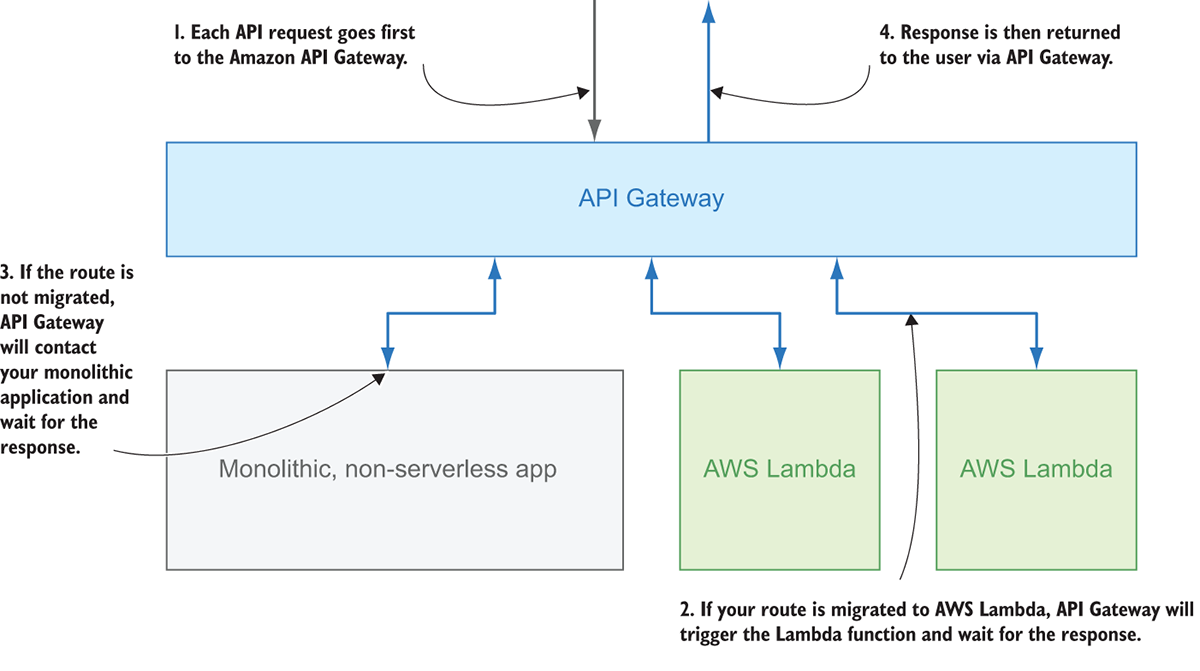
Figure 14.3 Migrating an API to serverless, step by step

This is an excerpt from Manning's book hapi.js in Action.
This section introduces a fictional HTTP API project that will be the focus of this chapter. First I gather some requirements for the API. Once it’s clear how the API should work, I design the endpoints through which clients can access the API.
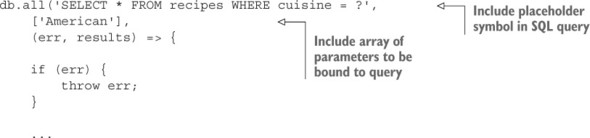
If I want to include data that has come from user input in the SQL query, I can’t simply concatenate this with the query using the + operator. That would leave the API open to an SQL injection attack. db.all() takes an additional, optional middle argument, which is an array of values to be sanitized and interpolated into the query. A ? character is placed in the query to denote where these values should be placed in the final query. Here is an example that uses this approach to search for recipes matching a cuisine.
To search recipes with the API, a user will call endpoint A, appending an optional search parameter to the query string. For example:
GET /api/recipes?cuisine=IrishThe API will respond with a JSON array of all found recipes that match the search query, as shown in figure 2.5.
If endpoint A is called without any search parameters, the API simply returns all the recipes in the database. The following listing uses the server.route() method to implement this simple case first.
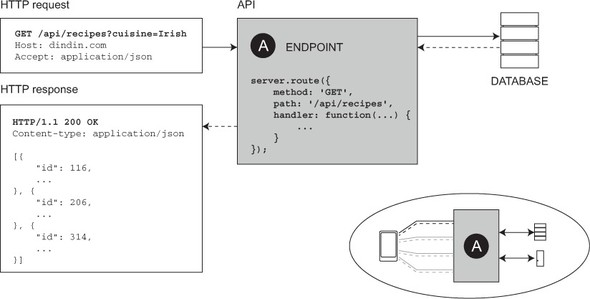
It’s very common when developing any system to first design the public-facing interface that you will offer to users. When developing a website, this might be the visual design of the UI. With an API, the interface is the HTTP endpoints that will be exposed—this is your contract with the consumer of the API, illustrated in figure 2.2. Each endpoint has a few important properties associated with it, namely the HTTP method used, the URI path, the parameters it can accept, and the structure of the response.