concept environment in category node

This is an excerpt from Manning's book Getting MEAN with Mongo, Express, Angular, and Node.js 2ED.
With this command, npm downloads and installs the new package in the node_modules folder. The --save flag tells npm to add this package to the list of dependencies in the package.json file. As of npm version 5, the --save flag is no longer required, as NPM saves changes to the package.json file automatically. We’ve added it here for completeness. When this command is run, npm generates a package-lock.json file to maintain versions of dependencies between environments, which is helpful when you’re deploying from development to a live server.
It’s important to manage opening and closing your database connections properly in every application you create. If you use an environment with different process termination signals, you should ensure that you listen to them all.
You can test this update to the code locally before pushing the code to Heroku by setting the environment variable as you start the application from terminal. The Mongoose connection events you set up earlier output a log to the console when the database connection is made, verifying the URI used.

This is an excerpt from Manning's book Isomorphic Web Applications: Universal Development with React.
Make sure any libraries you include in an isomorphic app support running in both the server and browser environments. Check out chapter 10 for what to watch for and how to handle differences in environments. If you intend to use a library only on the server, you don’t need to check for browser compatibility.
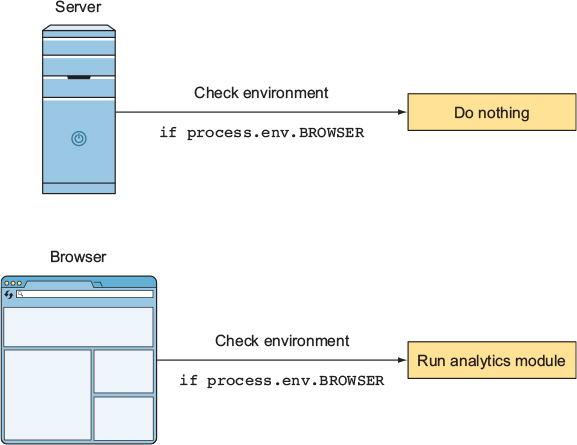
Other common use cases exist for changing code based on the environment. Another common reason you’d need to know the environment is to control which app routes are available. For example, maybe you need to create an internal access route—something that only a small number of people need access to. That might be an admin page or testing route. Conversely, you may want to have certain pages that aren’t directly accessible from the server, maybe for privacy reasons or because you don’t want the route to be accessible directly from the server.
Listing 10.3. Server startup script—package.json
"scripts": { ... "start": "NODE_ENV=development SERVER=TRUE node src/server.js", #1 ... }, #1 Add an environment variable to the start script. !@%STYLE%@! {"css":"{\"css\": \"font-weight: bold;\"}","target":"[[{\"line\":3,\"ch\":27},{\"line\":3,\"ch\":38}],[{\"line\":3,\"ch\":69},{\"line\":3,\"ch\":71}],[{\"line\":7,\"ch\":0},{\"line\":7,\"ch\":2}]]"} !@%STYLE%@!