concept Gulp in category node
This is an excerpt from Manning's book Node.js in Action, Second Edition.
Node is also a big part of the front-end development world, because it’s the main tool used when transpiling other languages such as TypeScript to JavaScript. Transpilers compile languages from one high-level language to another; this contrasts with traditional compilers, which compile from high-level to low-level languages. Chapter 4 is dedicated to front-end build systems, where we look at using npm scripts, Gulp, and webpack.
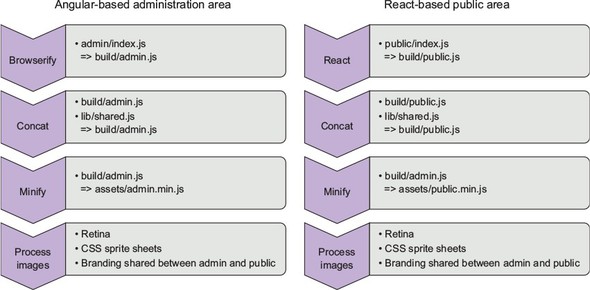
Gulp (http://gulpjs.com/) is a build system based on streams. You can route streams together to create build processes that do more than just transpile or minify code. Imagine you have a project with an administration area that’s built with Angular, but you have a React-based public area; both subprojects share certain build requirements. With Gulp, you can reuse parts of the build process for each stage. Figure 4.1 shows an example of these two build processes that share functionality.
Gulp helps you achieve a high level of reuse through two techniques: using plugins and defining your own build tasks. As the figure suggests, the build process is a stream, so you can pipe tasks and plugins through each other. For example, you can handle the React part of the previous example with Gulp Babel (www.npmjs.com/package/gulp-babel/) and the built-in gulp.src file globbing method:
To add Gulp to a project, you need to install both the gulp-cli and gulp packages with npm. Most people install gulp-cli globally, so Gulp recipes can be run simply by typing gulp. Note that you should run npm rm --global gulp if you had previously installed the gulp package globally. In the next snippet, you install gulp-cli globally and create a new Node project that has a Gulp development dependency:
Open the gulpfile. Now you’ll use Gulp to build a small React project. It’ll use gulp-babel (www.npmjs.com/package/gulp-babel), gulp-sourcemaps, and gulp-concat:
npm i --save-dev gulp-sourcemaps gulp-babel babel-preset-es2015
npm i --save-dev gulp-concat react react-dom babel-preset-react
Remember to use npm with --save-dev when you want to add Gulp plugins to a project. If you’re experimenting with new plugins and decide to remove them, you can use npm uninstall --save-dev to remove them from ./node_modules and update the project’s package.json file.