concept memory in category node

This is an excerpt from Manning's book Isomorphic Web Applications: Universal Development with React.
Another powerful server performance tool is caching. I’ve employed caching in different forms, including edge caching, in-memory caching, and saving views in a Redis (a NoSQL database) persisted cache. Each of these strategies has trade-offs, so it’s important to understand what these are and then pick the right strategy for your use case. Table 11.1 lists caching options.
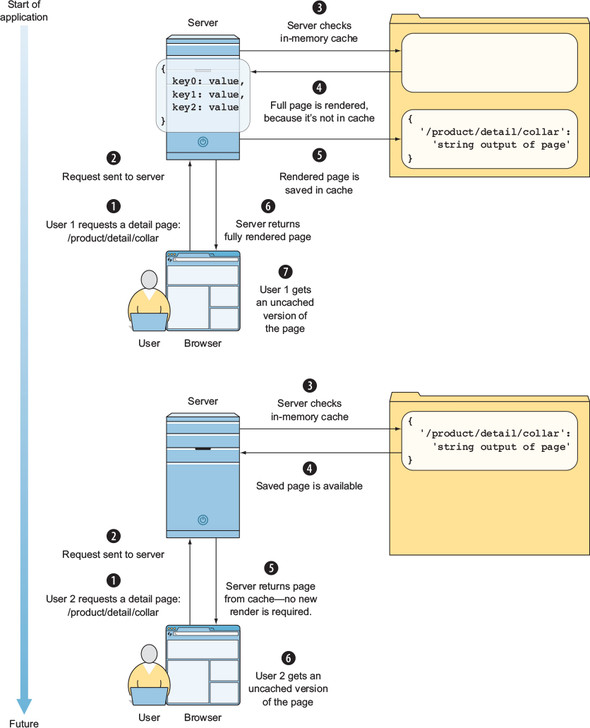
The easiest (and most naïve) solution for caching involves saving components directly in memory. For simple apps, you can achieve this by using a basic LRU cache (size-limited) and stringifying your components after they’re rendered. Figure 11.3 shows a timeline of using an in-memory cache. The first user to load a page gets a fully rendered (and slower) version of the page. This is also saved in the in-memory cache. All subsequent users get the cached version, until that page gets pushed out of the cache because the cache filled up.

This is an excerpt from Manning's book hapi.js in Action.
During Black Friday 2013, the Walmart Labs team shared their experiences with using Node in production with the world using the Twitter hashtag #nodebf. The team posted samples of code showing how parts of their infrastructure were put together. Some tweets showed graphs of flat lines for memory and CPU consumption throughout the day. These tweets caught the attention of everyone interested in learning how production-ready Node was for enterprise-scale applications.
When using the data option with a multipart request, hapi will wait until the entire payload has been received over the network and read into memory and will attempt to parse each of the parts of the form into request.payload. Any text fields from the form will be available as strings. The contents of any uploaded files will be available as either strings (for files with a text mime type such as text/plain) or Node Buffer objects (for all other file mime types).