concept Pizza API in category node

This is an excerpt from Manning's book Serverless Applications with Node.js.
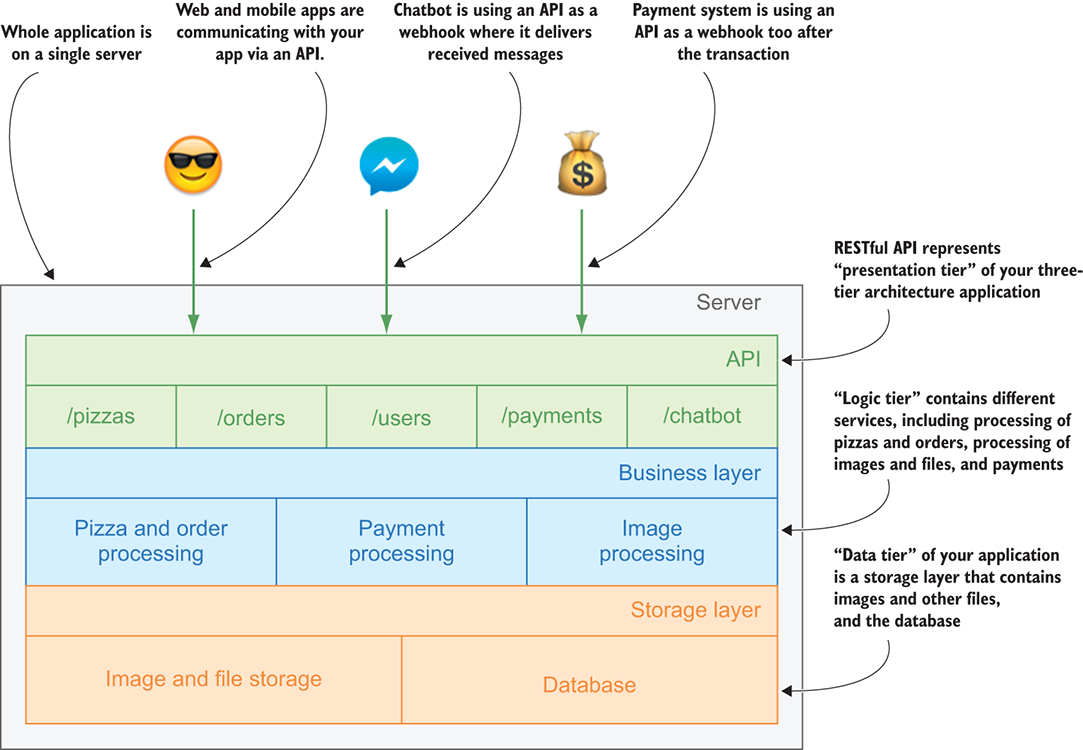
Figure 1.1 The typical three-tier design for the Pizza API
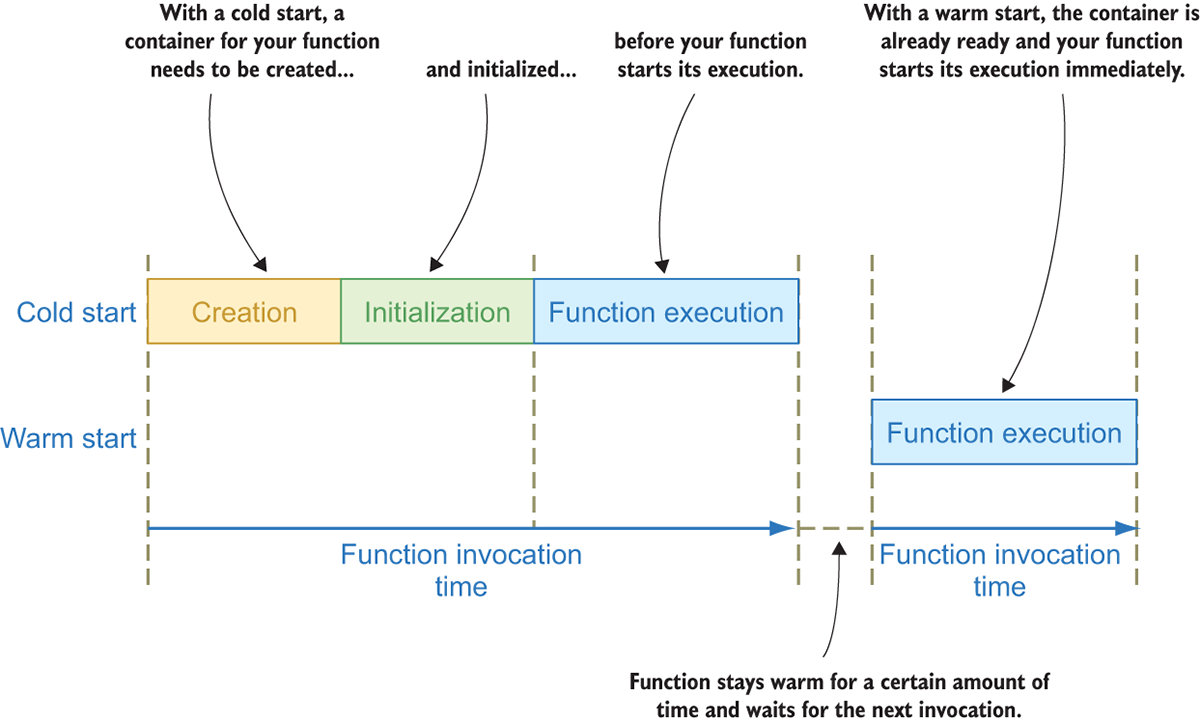
Another important thing that can affect your serverless Pizza API is function latency. Because the Lambda function containers are managed by the provider, not the application operators, there’s no way to know if a trigger will be served by an existing container or if the platform will instantiate a new one. If a container needs to be created and initialized before the function executes, it requires a bit more time and is called a cold start, as shown in figure 1.5. The time it takes to start a new container depends on the size of the application and the platform used to run it. Empirically and at the time of writing of this book, there are noticeably lower latencies with Node.js and Python than with Java.
Figure 1.5 Cold start versus hot start for an AWS Lambda function
Cost of the Pizza API
Developing the Pizza API as described in the following chapters of this book should cost less than a cup of coffee. AWS Lambda by itself will be free, but some of the services used for Pizza API development, such as DynamoDB and the Simple Storage Service, charge a small fee for the storage of your data. Both of those services and their pricing are described in later chapters. The final price of the application will depend on the amount of data and its usage, but if you are following the book’s examples, it should be less than $1 per month.
Listing 2.6 The updated api.js
'use strict'
const Api = require('claudia-api-builder')
const api = new Api()
const getPizzas = require('./handlers/get-pizzas')    #1

api.get('/', () => 'Welcome to Pizza API')    #2

api.get('/pizzas', () => {    #3
  return getPizzas()
})

api.get('/pizzas/{id}', (request) => {    #4
  return getPizzas(request.pathParams.id)
}, {
  error: 404    #5
})

module.exports = api

  #1   Import the get-pizzas handler from your handlers directory.
  #2   Add a simple root route that returns static text to make your API user-friendly.
  #3   Replace the inline handler function with the new one you imported.
  #4   Add the route for finding one pizza by its ID.
  #5   Customize success and error status codes.
Recently, Aunt Maria has noticed that pizza ordering occasionally doesn’t work for some customers—and Pierre, her mobile developer, has been reporting “ghost” bugs, sometimes even when displaying the pizza list. Aunt Maria is worried that she’s losing some customers and has asked you to take a look. You can try to debug the Pizza API to find out where the issue is, but the bug might also be on the website or in the mobile app. Testing all the services manually each time an issue occurs is tedious, repetitive, and takes too long. The solution is to automate testing. Automated testing requires an initial investment to write the code that will test your application, but then you can rerun it to check your Pizza API whenever you alter its functionality, add a new feature, or encounter a new issue.