concept project in category node

This is an excerpt from Manning's book Node.js in Action, Second Edition.
The -y flag means yes. That means npm will create a package.json file with default values. If you want more control, leave off the -y flag, and npm will run you through a set of questions about the project’s license, author name, and so on. After you’ve done this, look at the contents of package.json. You can manually edit it, but remember, it has to be valid JSON.
Recently, front-end and server-side developers have converged on using npm for distributing JavaScript. That means npm is used for front-end modules, such as React, and server-side code, such as Express. But some modules don’t neatly fall into either side: lodash is an example of a general-purpose library that can be used in Node and browsers. By packing lodash carefully, the same module can be consumed by Node and browsers, and the dependency within a project can be managed with npm.
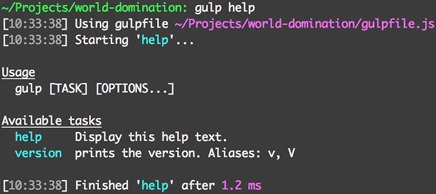
This technique can help you organize projects with complex build tasks, but it can also be paired with the gulp-help (www.npmjs.com/package/gulp-help) module. This module allows you to document Gulp tasks; running gulp help shows information about each task. This helps when you’re working in a team, or if you switch between lots of projects that use Gulp. Figure 4.2 shows what the output looks like.
Gulp is a general-purpose project-automation tool. It’s good when adding cross--platform housekeeping scripts to projects—for example, running complex client-side tests or bringing up fixtures for a database. Although it can be used for building client-side assets, there are also tools specifically designed to do that, which means they typically require less code and configuration than Gulp. One such tool is webpack, which focuses on bundling JavaScript and CSS modules. The next section demonstrates how to use webpack for a React project.
To add Gulp to a project, you need to install both the gulp-cli and gulp packages with npm. Most people install gulp-cli globally, so Gulp recipes can be run simply by typing gulp. Note that you should run npm rm --global gulp if you had previously installed the gulp package globally. In the next snippet, you install gulp-cli globally and create a new Node project that has a Gulp development dependency: