concept promise in category node
This is an excerpt from Manning's book Get Programming with Node.js.
Luckily, you can use multiple other types of syntax to wrap your callbacks and handle returned data or errors in a more elegant way. Promises are a way to do that, and Mongoose offers support for using the promise syntax within your application.
ES6 made popular the idea of using promises to facilitate a chain of functions, usually callback functions, in asynchronous queries. A promise is a JavaScript object that contains information about the state of a function call and what the next call in the chain needs to see. Similar to middleware, promises can allow a function to start and patiently wait for it to complete before passing it off to the next callback function. Ultimately, promises offer a cleaner way of representing nested callbacks, and with database queries now introduced to your applications, your callback functions can get long.
Luckily, Mongoose is built to work with promises. All you need to do to get set up is let Mongoose know that you want to use native ES6 promises by adding mongoose.Promise = global.Promise near the top of main.js. Now with each query made, you can choose to return the normal database response or a promise containing that response. In listing 15.7, for example, a query to get all subscribers from the database returns a new promise with the database’s response.
Rewriting this action with a promise still allows querying of all subscribers in the database. Within the query, instead of rendering a view immediately, return a promise that contains data on whether to resolve by rendering a view or reject by logging an error. By using the exec call following find, you’re invoking your query to return a promise.
then is used only in the context of promises. next is used in a middleware function. If both are used, as in listing 15.7, you’re waiting for a promise to resolve with then and later calling next to go to another middleware function.
You can add as many then chains as you like, ultimately telling your promise to run the code within that block when everything else is complete. The final then block logs a message to your console to let you know that the promise completed.
Listing 15.7. Using promises to get all subscribers in subscribersController.js
exports.getAllSubscribers = (req, res) => {       #1
  Subscriber.find({})
    .exec()                                       #2

    .then((subscribers) => {                      #3
      res.render("subscribers", {
        subscribers: subscribers
      });                                         #4
    })
    .catch((error) => {                           #5
      console.log(error.message);
      return [];
    })
    .then(() => {                                 #6
      console.log("promise complete");
    });
};
You may also modify your save command in saveSubscriber to use promises as shown in the following listing. In this example, exec isn’t needed.

This is an excerpt from Manning's book Getting MEAN with Mongo, Express, Angular, and Node.js 2ED.
In Angular, HTTP requests run asynchronously and return Observables, but you want to wait until the data is complete before working with it, so you’ll convert them to Promises. For a quick explanation, see the sidebar “Observables and Promises.”
Observables and Promises
Observables and Promises are great ways of handling asynchronous requests. Observables return chunks of data in a stream, whereas Promises return complete sets of data. Angular includes the RxJS library for working with observables, including converting them into Promises.
Promises are first-class citizens of the JavaScript specification. They have three states:
We use Promises in the Loc8r application, but not in a complicated way. The Promises API provides some static functions that help if you’re trying to execute multiple Promises.
Promise.all() accepts an iterable of Promises and returns a Promise when all items in the array fulfill or reject. The resolve() callback receives an array of responses: a mixture of Promise-like objects and other objects in order of fulfillment. If one of the executed Promises rejects, the reject() callback receives a single value.
Listing D.48. Promise.all()
const promise1 = new Promise((resolve, reject) => resolve() );
const promise2 = new Promise((resolve, reject) => resolve() );
const promise3 = new Promise((resolve, reject) => reject() );
const promise4 = new Promise((resolve, reject) => resolved() );

Promise.all([
  promise1,
  promise2,
  promise3,
  promise4
])
.then(([]) => {/* process success data iterable */})      #1
.catch(err => console.log(err));                          #2
Promise.race() also accepts an iterable, but the output of Promise.race() is different. Promise.race() executes all provided Promises and returns the first response value that it receives whether this value is a fulfillment or a rejection.
Listing D.49. Promise.race()
const promise1 = new Promise((resolve, reject) =>
setTimeout(resolve, 1000, 'first') );
const promise2 = new Promise((resolve, reject) =>
setTimeout(reject, 200, 'second') );

Promise.race([promise1, promise2])
  .then(value => console.log(value))
  .catch(err => console.log(err));          #1
Because Promises rely on callbacks, due to their asynchronous nature, you can get into a muddle if several callbacks are nested. Finding yourself in a deeply nested callback structure is often referred to as callback hell. Promises somewhat mitigate this problem by providing a structure and making the asynchronicity explicit.

This is an excerpt from Manning's book Serverless Applications with Node.js.
The pizzeria processes include dough rising, baking, pizza ordering, and so on. These are asynchronous operations. If they were synchronous, Aunt Maria’s pizzeria would be blocked and stopped from working on anything else until the operation in progress finished. For example, you would wait until the dough had risen, and then do something else. And for such time-wasting, Aunt Maria would fire anyone, even you! Because most of the JavaScript runtimes are single-threaded, many longer operations, such as network requests, are executed asynchronously. Asynchronous code execution is handled by two known concepts: callbacks and promises. At the time of this writing, promises are the recommended way to go in all Node.js applications. We do not explain callbacks, as you are most likely already familiar with them.
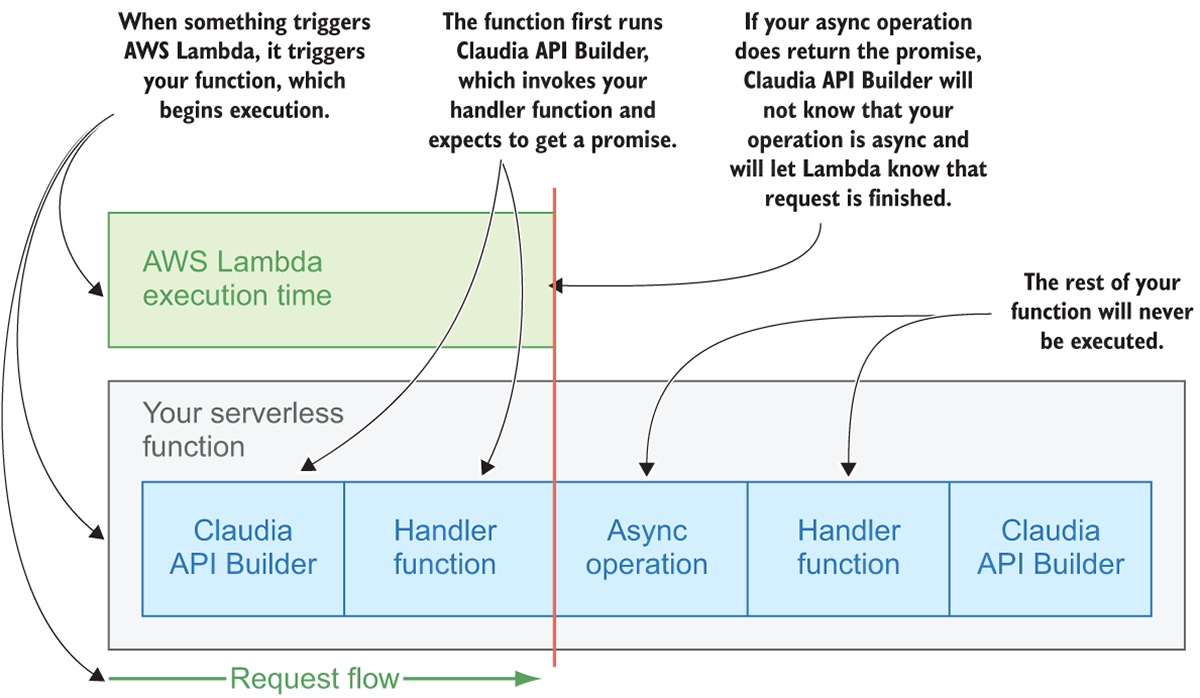
Forgetting to return a promise
Listing 4.4 Breaking the code by not returning a promise
module.exports = function(pizza, address) {
  docClient.put({    #1
    TableName: 'pizza-orders',
    Item: {
      orderId: uuid(),
      pizza: pizza,
      address: address,
      status: 'pending'
    }
  }).promise()

  #1   This line is no longer returning a promise.
Why is this a problem? As you can see in figure 4.4, if your async operation doesn’t return a promise, Claudia API Builder won’t know that the operation is asynchronous, and it will tell AWS Lambda that the function has finished its execution. It will also send
undefinedas the value of your function because you never returned anything meaningful.Figure 4.4 A visual representation of Lambda execution when an async operation doesn’t return a promise