concept test in category node
This is an excerpt from Manning's book Get Programming with Node.js.
In this lesson, you learned how to change your application’s start script. You also learned how to log and manage some of the errors that occur in your Express.js application. At the end of the lesson, you set up Express.js to serve static assets from your public folder. Now you have quite a few tools at your disposal to use in building your recipe application. In lesson 12, you put what you’ve learned to the test by restructuring the Confetti Cuisine application.
Last, create two assertions where you expect the results of your promises to yield an array, where the second item contains all the users in your database. Because you created a single user, you expect the size of the array of users to be 1. Similarly, you expect the only user in that array to have an _id property, indicating that it has been saved to your MongoDB database. When your test is complete, call done to indicate that the tests are complete and promises are resolved.
This is an excerpt from Manning's book Node.js in Action, Second Edition.
If the idea of automated testing is new to you, think of it as a robot doing all of the boring stuff while you focus on the interesting work. Every time you make a change to the code, the robot ensures that bugs haven’t crept in. Although you may not have completed or started your first Node application yet, it’s good to get a handle on how to implement automated testing because you’ll be able to write tests as you develop.

The tests you can write using the Vows unit-testing framework are more structured than those of many other frameworks, with the structure intended to make the tests easy to read and maintain.
This is an excerpt from Manning's book Express in Action: Writing, building, and testing Node.js applications.
Gulp calls itself the “streaming build system.” It’s an alternative to tools like Grunt, and it allows you to compile assets, minify code, run tests, and more. It uses Node’s streams to increase performance. See http://gulpjs.com/ for more information.
Write, run, and organize tests for general Node.js code to make sure your functions and models work as intended (using tools called Mocha and Chai)


This is an excerpt from Manning's book hapi.js in Action.
Read that statement aloud, and it sounds pretty much like English. When you write assertions like that, tests are a lot easier to read. Another benefit of using an assertion library like Code over Node’s built-in Assert library is for the quality of error messages that you get when assertions fail. The following listing compares the two.
Starting test 1
Finishing test 1
Starting test 2
Finishing test 2
This is an excerpt from Manning's book Node.js in Practice.
This test can be run with node test.js, and you should see Assertions passed: 1 printed in the console. The test actually reads the current file and passes the data through CountStream. It might invoke Ouroboros, but it’s a useful example because it gives us content that we know something about—we can always be sure there is one match for the word example.
One of the advantages of working with Node is that the community adopted testing early on, so there’s no shortage of modules to help you write fast and readable tests. You might be wondering what’s so great about tests and why we write them early on during development. Well, tests are important for exploring ideas before committing to them—you can think of them like small, flexible experiments. They also communicate your intent, which means they help document and expand on the ideas in the key parts of the project. Tests can also help reduce maintenance in mature projects by allowing you to check that changes haven’t broken existing working features.
The first thing to learn about is Node’s assert module. This module allows you to define an expectation that will throw an error when it isn’t met. Expressing and confirming expectations is the main purpose of tests, so you’ll see a lot of assertions in this chapter. Although you don’t have to use assert to write tests, it’s a built-in core module and similar to assertion libraries you might’ve used before in other languages. The first set of techniques in this chapter is all about assertions.
To get everyone up to speed, the next section includes a list of common terms used when working with tests.
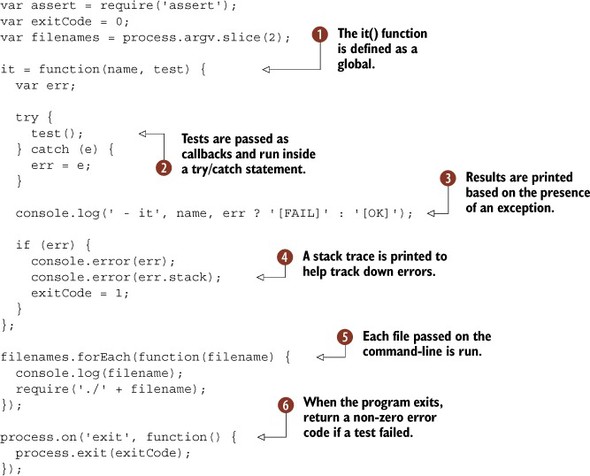
 , and is called it so the tests and their output read logically. This makes sense when the results are printed
 .
This test can be run with ./node_modules/tap/bin/tap.js test/*_test.js. You can add this line to the test property of scripts in the package.json file to make it run with npm test.
If you run the test with the tap script, you’ll see some clean output that consolidates the results of each assertion. This is generated by one of tap’s submodules called tap-results. The purpose of the tap-results module is to collect lines from a TAP stream and count up skips, passes, and fails to generate a simplified report;
ok test/index_test.js ................................... 3/3
total ................................................... 3/3

ok
Due to the design of the tap module, you’re free to run the tests with node test/index_test.js. This will print out the TAP stream instead:
# Alex's handy mathematics module
# square
ok 1 should be equal
# randomTimeout
ok 2 (unnamed assert)

1..2
# tests 2
# pass  2

# ok
Tests written with the tap module will still return a non-zero exit code to the shell when tests fail—you can use echo $? to see the exit code. Try making the test in listing 10.15 fail on purpose and take a look at $?.
The fact that TAP is designed around producing and consuming streams fits in well with Node’s design. It’s also a fact of life that tests must interact with other automated systems in most projects, whether it’s a deployment system or a CI server. Working with this protocol is easier than heavyweight XML standards, so hopefully it will rise in popularity.
When you’re working in a team, you want to quickly see when someone has committed changes that break the tests. This section will help you to set up a continuous integration server so you can do this. It also has techniques for other project-related issues like using databases with tests and mocking web services.