concept reverse index in category nosql

This is an excerpt from Manning's book Making Sense of NoSQL.
Reverse index —A reverse index is a structure similar to the index you’ll find in the back of a book. In a book, each of the entries is listed in alphabetical order at the end of the book with the page numbers where the entry occurs. You can go to any entry in the index and quickly see where that term is used in the book. Without an index, you’d be forced to scan through the entire book. Search software uses reverse indexes in the same way. For each word in a document collection there’s a list of all the documents that contain that word. Figure 7.2 contains a screen image of a Lucene index of the works of Shakespeare. Search frameworks such as Apache Lucene are designed to create and maintain reverse indexes for large document collections. These reverse indexes are used to speed the lookup of documents that contain keywords.
One of the most time-consuming parts of building any search system is creating the reverse indexes for new full-text documents as they’re imported into your NoSQL database. A typical 20-page document with 5,000 words can result in 5,000 additions to your reverse index. Indexing 1,000 documents into your collection would require approximately five million index updates. Spreading the load of this process over multiple servers is the best way to index large document collections.
MapReduce is an ideal tool to use when creating reverse indexes due to its ability to scale horizontally. Creating reverse indexes was the primary driver behind the Google MapReduce project, and the reason the Hadoop framework was created. Let’s take a step-by-step look at how you can use MapReduce to create reverse indexes.
To design a MapReduce job, you must break the problem into multiple steps. The first step is to write a map function that takes your inputs (the source documents) and returns a set of key-value pairs. The second step is to write a reduce function that will return your results. In this case, the results will be the reverse index files. For each keyword, the reverse index lists what documents contain that word.
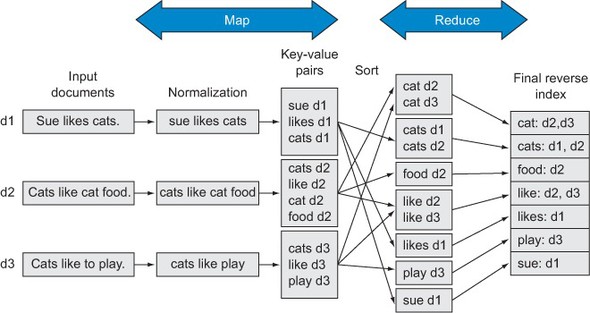
Figure 7.6 shows the detailed steps in this process. You can see from this figure that before you process the inputs, you remove uppercase letters and small stop words such as the, and, or, and to, since it’s unlikely they’ll be used as keywords. You then create a list of key-value pairs for each word where the document ID is the “value” part of the key-value pair. The MapReduce infrastructure then performs the “shuffle and sort” steps and pass the output to the final reduce phase that collapses each of the word-document pairs into a word-document list item, which is the format of the reverse indexes.
Figure 7.6. Using the MapReduce algorithm to create a reverse index. The normalization step removes punctuation and stop words and converts all words to lowercase. The output of the map phase must be a set of key-value pairs. The reduce function groups the keyword documents to form the final reverse index.