concept user in category oculus rift

This is an excerpt from Manning's book Oculus Rift in Action.
Immersion is the art and technology of surrounding the user with a virtual context, such that there is world about, below, and all around you.
• Following the golden rule of VR comfort: The user is in control of the camera
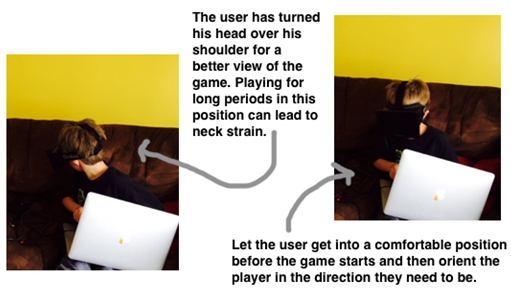
The Oculus Health and Safety warnings found in the Oculus Best Practices guide, tell the user to "remain seated whenever possible" and Oculus has stated that they are targeting a seated experience at this time. When using the Rift, the user will typically be seated and they will naturally get themselves into a comfortable position. You want the user to be able to remain in that comfortable position even after putting on the Rift. However, when observing people using the Rift we’ve seen them put the Rift on and then twist around to get a better view and then spend the entire time trying to navigate a demo with their head turned towards their shoulder. When they took off the Rift, they complained that their neck hurt (Figure 7.1).
Figure 7.1: Don’t force the user to look over their shoulder to get a good view.
Encourage users to set and use their user profile
Creating a user profile is ultimately up to the user, and if a profile has not been set up, the default profile is automatically used. To help your users have the best possible experience, you should encourage the user to create a profile. To encourage the user to create a profile, you can
• Stress the importance of setting up a profile in the application’s documentation. Be sure to cover exactly how to set up a profile and why it needs to be done. Documentation is a good start, but relying on users to read and follow the documentation, something we all know many users will not do, isn't a complete solution. • Provide the user with a way to select and update the profile from within your application. You can display the current profile settings and prompt the user to either use those settings or create another profile. To get the name of the current profile, use: ovr.Hmd_GetString(hmd, OVR_KEY_USER, “”)If default is returned, prompt the user to create a profile.
A profile will help the user have the best possible VR experience while they are playing, it is important to remember that users are going to get tired and they are going to need to take breaks.