concept OpenGL in category opencl

This is an excerpt from Manning's book OpenCL in Action: How to Accelerate Graphics and Computation.
If the cl_khr_gl_sharing extension is supported, you need to provide two objects: the OpenGL context and the display/device used to display the context. Because OpenGL can run on multiple operating systems, the precise nature of these objects is OS-specific, but all of them must be cast to cl_context_properties.
OpenGL is a vast topic, and for a full discussion of the API, I recommend The OpenGL SuperBible by Richard S. Wright et al. In contrast, the humble goal of this appendix is to provide you with enough background to enable you to code simple 3-D applications. The discussion will follow the right side of figure B.2. We’ll examine how the host packages data first and then look at how to code vertex and fragment shaders. Then we’ll see how the OpenGL Utility Toolkit (GLUT) creates windows that OpenGL applications can draw on.
But before getting into OpenGL and GLUT coding, it’s important to have the required libraries and header files. Therefore, the first section will cover OpenGL installation.
The glPixelStorei and glTexParameteri functions both provide OpenGL with information about the texture. The first identifies how the texture’s pixels are stored in memory. To create a texture from uncompressed data, the parameter name should be GL_UNPACK_ALIGNMENT and the value should be the byte alignment of each pixel row. For example, the following code specifies that the pixel rows are stored at 1-byte boundaries:
glPixelStorei(GL_UNPACK_ALIGNMENT, 1);The parameters accepted by glTexParameteri are more involved and tell OpenGL how the texture should be displayed in the rendering. Table B.13 lists six of the parameter names accepted by glTexParameteri and the nature of the information they provide.
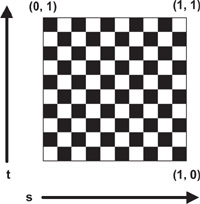
The last two parameters in the table relate to texture coordinates. Before OpenGL can apply a texture to a model’s surface, the application must match the texture’s coordinates to vertex coordinates. For two-dimensional textures, the coordinates are given in (s, t) pairs. This is shown in figure B.7.
The responsibility for creating the correspondence between these coordinates falls to the vertex shader, and this will be discussed shortly. For now, it’s important to know that the GL_TEXTURE_WRAP_S and GL_TEXTURE_WRAP_T parameters tell OpenGL what to display when the texture coordinates go beyond the minimum and maximum. Both parameters accept the same five values: GL_CLAMP, GL_CLAMP_TO_BORDER, GL_CLAMP_TO_EDGE, GL_MIRRORED_REPEAT, and GL_REPEAT. Chapter 6 discusses these values and figure 6.1 shows how the resulting textures are displayed.
As an example, the following code creates a texture and makes it active. Then it calls glTexParameteri to tell OpenGL that bilinear interpolation should be used for enlargement and minimization. Also, pixels at coordinates beyond the texture should be repetitions of the texture’s pixels: