concept texture in category opencl

This is an excerpt from Manning's book OpenCL in Action: How to Accelerate Graphics and Computation.
The clGetGLObjectInfo function identifies what type of OpenGL object (VBO, texture, or renderbuffer) was used to create an OpenCL memory object. Its signature is as follows:
Textures make it possible to associate image data with the surfaces of a model. If you think of OpenGL vertices as forming a skeleton, then textures form the skin. Figure B.6 shows how this works. The texture_squares application creates textures from the three images on the left and uses them to cover the squares.
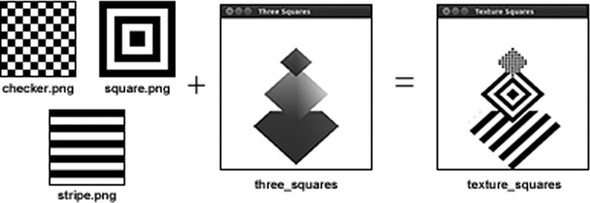
But textures are easier to work with than wallpaper because there’s no need to do any measuring. OpenGL will stretch or shrink the texture as needed to fit the space. Also, if a texture needs to be minimized, you can tell OpenGL to use miniaturized versions of the texture called mipmaps.
As an example, the following code creates a texture and makes it active. Then it calls glTexParameteri to tell OpenGL that bilinear interpolation should be used for enlargement and minimization. Also, pixels at coordinates beyond the texture should be repetitions of the texture’s pixels:
glGenTextures(1, &texture);
glBindTexture(GL_TEXTURE_2D, texture);
glPixelStorei(GL_UNPACK_ALIGNMENT, 1);
glTexParameteri(GL_TEXTURE_2D, GL_TEXTURE_WRAP_S, GL_REPEAT);
glTexParameteri(GL_TEXTURE_2D, GL_TEXTURE_WRAP_T, GL_REPEAT);
glTexParameteri(GL_TEXTURE_2D, GL_TEXTURE_MAG_FILTER, GL_LINEAR);
glTexParameteri(GL_TEXTURE_2D, GL_TEXTURE_MIN_FILTER, GL_LINEAR);
After the texture is created and its characteristics are set, glTexImage2D can be used to associate the texture with pixel data. This serves a purpose similar to glBufferData, but in addition to the data dimensions, glTexImage2D also needs to know how the pixels in the texture, called texels, are organized. Table B.12 lists all the arguments of this function; three important arguments are as follows: