concept image in category openshift

This is an excerpt from Manning's book OpenShift in Action.
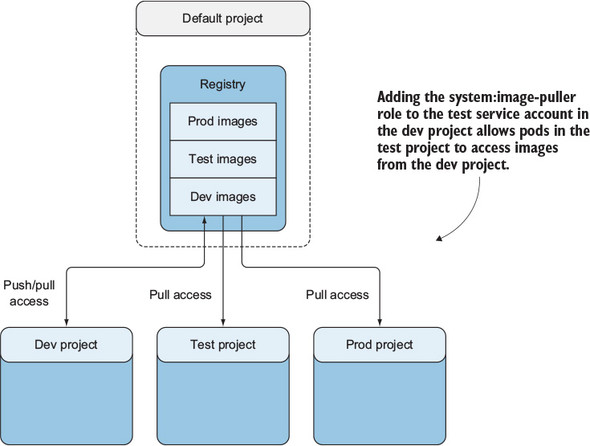
Next, you’ll deploy the same image that you built in the dev environment into your test environment. By default, image streams in the OpenShift project can be seen by all other projects. But image streams created in other projects, such as those in the dev project, aren’t visible outside those individual projects. The image streams have limited scope in order to provide increased security. It’s recommended that users and teams who want to share images with other projects, such as in a CI/CD context, should modify this behavior using the OpenShift CLI. Run this command to allow the test project to pull images from the dev project:
$ oc policy add-role-to-group \ system:image-puller \ #1 system:serviceaccounts:test \ #2 -n dev #1 The system:image-puller role allows users/groups to pull images from projects. #2 Applies the change to serviceaccounts in the test project !@%STYLE%@! {"css":"{\"css\": \"font-weight: bold;\"}","target":"[[{\"line\":1,\"ch\":40},{\"line\":1,\"ch\":42}],[{\"line\":5,\"ch\":0},{\"line\":5,\"ch\":2}],[{\"line\":2,\"ch\":40},{\"line\":2,\"ch\":42}],[{\"line\":6,\"ch\":0},{\"line\":6,\"ch\":2}]]"} !@%STYLE%@!The test project can now access images in the dev project. Next, deploy the image tagged promoteToTest in the dev project into your test project:
Earlier in the chapter, you set up your test project manually and ran the oc policy command to allow the test project to access images from the dev project. In setting up the prod environment, this was handled for you by the template. At this point, the dev project is the only project with a build config. All projects are built in dev. The test and prod projects have access to pull these images but not modify or push new ones, as shown in figure 6.9.
In this chapter, you’ll build a CI/CD pipeline in OpenShift. To keep the promise of using the same binary in every environment, you’ll build your image just once in your development environment. You’ll then use image tagging to indicate that the image is ready to be promoted to other projects. To facilitate this process, you’ll use Jenkins and some additional OpenShift concepts, which you’ll learn about as you go. Jenkins is an open source automation server that’s commonly used as the backbone for CI/CD pipelines because it has many plugins for existing tools and technologies. Jenkins often becomes a Swiss army knife that’s used to integrate disparate technologies into a CI/CD pipeline.