concept network in category openstack

This is an excerpt from Manning's book OpenStack in Action.
Out of many commercial and open source cloud management packages to be developed during this period, the OpenStack project was one of the most popular. OpenStack provides a common platform for controlling clouds of servers, storage, networks, and even application resources. OpenStack is managed through a web-based interface, a command-line interface (CLI), and an application programming interface (API). Not only does this platform control resources, it does so without requiring you to choose a specific hardware or software vendor. Vendor-specific components can be replaced with minimum effort. OpenStack provides value for a wide range of people in IT organizations.
Listing 5.4. Checking the network for updates
$ifconfig -a em1 Link encap:Ethernet HWaddr b8:2a:72:d3:09:46 inet addr:10.33.2.50 Bcast:10.33.2.255 Mask:255.255.255.0 inet6 addr: fe80::ba2a:72ff:fed3:946/64 Scope:Link UP BROADCAST RUNNING MULTICAST MTU:1500 Metric:1 RX packets:3014 errors:0 dropped:0 overruns:0 frame:0 TX packets:656 errors:0 dropped:0 overruns:0 carrier:0 collisions:0 txqueuelen:1000 RX bytes:2829516 (2.8 MB) TX bytes:94684 (94.6 KB) Interrupt:35 em2 Link encap:Ethernet HWaddr b8:2a:72:d3:09:47 inet addr:192.168.0.50 Bcast:192.168.0.255 Mask:255.255.255.0 inet6 addr: fe80::ba2a:72ff:fed3:947/64 Scope:Link UP BROADCAST RUNNING MULTICAST MTU:1500 Metric:1 RX packets:1 errors:0 dropped:0 overruns:0 frame:0 TX packets:6 errors:0 dropped:0 overruns:0 carrier:0 collisions:0 txqueuelen:1000 RX bytes:64 (64.0 B) TX bytes:532 (532.0 B) Interrupt:38
You’ll want to install the package bridge-utils, which provides a set of applications for working with network bridges on the system (OS) level. Network bridging on the OS level is critical to the operation of OpenStack Networking. For the time being, it’s sufficient to think about network bridges under Linux as simply placing multiple interfaces on the same network segment (the same isolated VLAN). The default operation of Linux network bridging is to act like a switch, so you can certainly think of it this way.
In addition, you may want to install the vlan package, which provides the network subsystem the ability to work with Virtual Local Area Networks (VLANs) as defined by IEEE 802.1Q. VLANs allow you to segregate network traffic using VLAN IDs on virtual interfaces. This allows a single physical interface managed by your OS to isolate multiple networks using virtual interfaces. VLAN configuration won’t be used in the examples, but you should be aware of the technology.
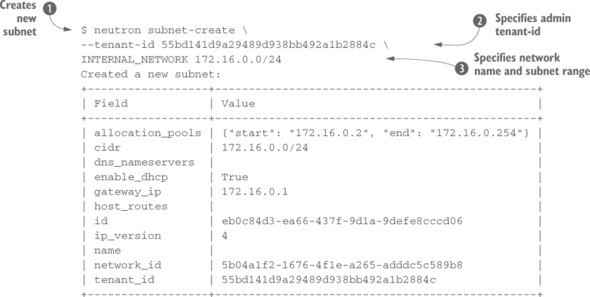
First you tell OpenStack Networking (Neutron) to create a new subnet
. Then you specify the admintenant-id on the command line
. Finally you specify the name of the network where the subnet should be created and the subnet range to be used on the internal network in CIDR notation
. Don’t forget, if you need to find the admintenant-id, use the Keystone tenant-id command.
You want to configure the network with three interfaces: