concept tenant in category openstack

This is an excerpt from Manning's book OpenStack in Action.
For the end user —OpenStack is a self-service system for infrastructure and applications. Users can do everything from simply provisioning virtual machines (VMs) like with AWS, to constructing advanced virtual networks and applications, all within an isolated tenant (project) space. Tenants, also known as projects, are the way that OpenStack isolates assignments of resources. Tenant isolation includes storage, network, and VM isolation, so end users can be given much more freedom than in traditional virtual server environments. Imagine end users being assigned a quota of resources that they could easily provision how and when they want. Virtual machines and tenants
OpenStack is natively multi-tenant-aware. As mentioned in chapter 2, you can think of your OpenStack deployment as a hotel. A person can’t be a resident of a hotel unless they have a room, so you can think of tenants as hotel rooms. Instead of beds and a TV, Hotel OpenStack provides computational resources. Just as a hotel room is configurable (single or double beds, a suite or a room, and so on), so are tenants. The number of resources (vCPU, RAM, storage, and the like), images (tenant-specific software images), and the configuration of the network are all based on tenant-specific configurations. Users are independent of tenants, but users may hold roles for specific tenants. A single user might hold the role of administrator in multiple tenants. Every time a new user is added to OpenStack, they must be assigned a tenant. Every time a new instance (VM) is created, it must be created in a tenant. Management of all OpenStack resources is based on the management of tenant resources.
Because your access to OpenStack resources is based on tenant configurations, you must understand how to create new tenants, users, roles, and quotas. In chapter 2 you used DevStack, which created a few sample tenants and users for you. In the next few subsections, you’ll walk through creating a new tenant and all the related objects that go with it, from scratch. As an OpenStack administrator, this will be a common task. A department or even a project might be a new tenant. Tenants will be the fundamental way that you divide and manage configurations and resources in OpenStack.
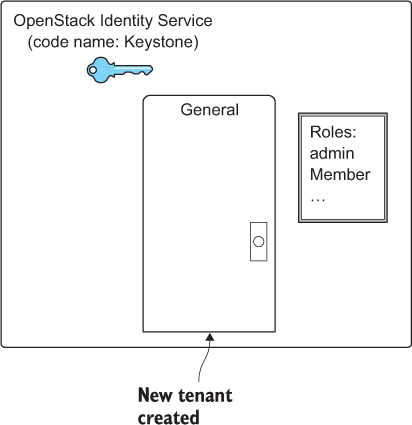
You’ve now created a new tenant that will be referenced when creating other OpenStack objects. Take note of the tenant ID generated in this process; you’ll need this ID for the next steps. Figure 3.2 illustrates the tenant you just created. The admin and Member roles were created as part of the DevStack deployment of OpenStack. The sidebar “Listing tenants and roles” explains how to list all tenants and roles for a particular OpenStack deployment.
Listing tenants and roles