concept HotSwap in category osgi

This is an excerpt from Manning's book OSGi in Action: Creating Modular Applications in Java.
Thankfully, there is an answer to the question we just asked. You may know it as HotSwap. HotSwap is a feature of the Java 5 debugging architecture that lets you change the definition of a class at execution time without having to restart the JVM. The technical details behind HotSwap are outside of the scope of this book; what’s more interesting is whether it works correctly with OSGi.
To use HotSwap, you need to attach a native agent at startup to the low-level debugging hooks provided by the JVM. One such agent is attached whenever you run an application under jdb. Although jdb provides a basic redefine command to swap in newly compiled classes, it won’t work for the previous example. Jdb refuses to redefine classes that have multiple versions loaded, because it can’t determine which version should be redefined. But what about Eclipse? Can it help you update the right version of DefaultShape?
What happened? Most, if not all, of you got an error message like the one in figure 8.6, saying the JVM couldn’t add a method to an existing class. This happened because Eclipse tried to update both versions of the DefaultShape class. Although it was able to redefine the broken setColor() method in the version from this chapter, there is no such method in the DefaultShape class from chapter 4. Instead, the debugger attempted to add the setColor() method to the old class, but adding methods isn’t supported by the current Sun implementation of HotSwap. Even worse, if you decide to ignore this error message and continue, you still get the same exception as before when painting shapes.
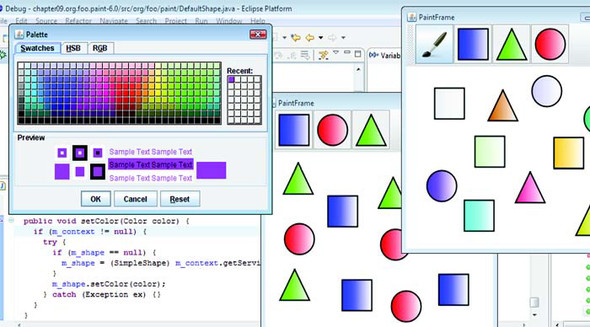
Alternative implementations of HotSwap do support adding methods. You can find one such implementation in the IBM JDK (www.ibm.com/developerworks/java/jdk/). If you debug the same example using IBM Java 6 as the target runtime (remembering, of course, to first revert the setColor() method back to the broken version), you can successfully fix the problem without restarting the process. Figure 8.7 confirms that even after using HotSwap to squish the bug, both the old and new paint examples continue to work on the IBM JDK.
Although you eventually managed to use HotSwap to fix the problem in your bundle, this isn’t exactly what you want, because all versions of DefaultShape were updated. By chance, this didn’t affect the old paint example because you were adding a completely new method. It has no effect on the old application and sits there unused. But what if you wanted to change a method that was tightly coupled to existing code? You could end up fixing one version only to find out you’d broken all the others by unintentionally upgrading them with the new logic. This may not be a big deal during development, because you’ll probably be focusing on one version at a time; but can you do better when debugging OSGi applications in the field?