concept OSGi bundle in category osgi

This is an excerpt from Manning's book Enterprise OSGi in Action.
We don’t expect enterprise OSGi developers to work in isolation from all of the non-OSGi code that exists. In fact, we would think you rather over-zealous if you tried to. Rather than having to give up all those useful libraries, or waiting for them to be packaged as OSGi bundles (which you should still ask for!), it’s important to learn how to work with what’s already out there.
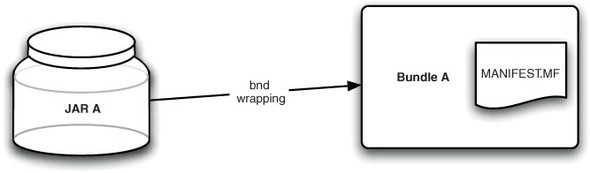
As we’ve said before, it’s a sad fact that there are many useful Java libraries that aren’t yet available as OSGi bundles. You now know how to turn these JARs into bundles by hand by updating the manifest with the right headers, but it’s not particularly easy. You might be able to work out which packages to export, based on a published API, but how do you know what to import? If it was easy to work out a bundle’s dependencies by looking at it, setting a normal Java classpath wouldn’t be such a nuisance! See figure 12.1.
Figure 12.1. Tools can take a conventional Java JAR and produce sensible OSGi bundles more reliably than converting them by hand.
Rather than suffer through the slow process of converting every library JAR by hand, a few OSGi developers turned their attention to automating the process. Reading through this section, you’ll see that there are a few problems with automatic bundle conversion, but that for the most part it dramatically speeds up the process of building an OSGi bundle. A number of tools are available for you to use, too many for us to describe all of them in detail. We’ll cover the most popular options.
As we’ve already mentioned, the Java ecosystem is large and contains a huge number of libraries providing all manner of functions. Some of these libraries are widely used; others are specific to certain fields and may only be useful to a handful of developers; but in all cases, they provide something that other people want to use, and don’t want to have to write for themselves. Because these libraries are developed by such a big community, you can’t rely on them always being provided as OSGi bundles. After all, not everyone has been using OSGi for the last decade!

This is an excerpt from Manning's book OSGi in Action: Creating Modular Applications in Java.
To see this example in action, go in the chapter01/greeting-example/modularity/ directory in the book’s companion code, and type ant to build it and java -jar main.jar to run it. Although the example is simple, it illustrates that creating OSGi bundles out of existing JAR files is a reasonably non-intrusive process. In addition, there are tools that can help you create your bundle metadata, which we’ll discuss in appendix A; but in reality, no special tools are required to create a bundle other than what you normally use to create a JAR file. Chapter 2 will go into all the juicy details of OSGi modularity.
Externally useful classes are those composing the public API of the code contained in the JAR file, whereas non-useful classes form the implementation details. Standard JAR files don’t provide any mechanism to differentiate externally useful classes from non-useful ones, but OSGi does. A standard JAR file exposes everything relative to the root by default, but an OSGi bundle exposes nothing by default. A bundle must use the Export-Package manifest header to explicitly expose internal classes it wishes to share with other bundles.