concept paint program in category osgi

This is an excerpt from Manning's book OSGi in Action: Creating Modular Applications in Java.
From a functionality perspective, the paint program only allows the user to paint various shapes, such as circles, squares, and triangles. The shapes are painted in predefined colors. Available shapes are displayed as buttons in the main window’s toolbar. To draw a shape, the user selects it in the toolbar and then clicks anywhere in the canvas to draw it. The same shape can be drawn repeatedly by clicking in the canvas numerous times. The user can drag drawn shapes to reposition them. This sounds simple enough. The real value of using a visual program for demonstrating these concepts will become evident when we start introducing execution-time dynamism.
This chapter will familiarize you with the features of the lifecycle layer and explain how to effectively use them. In the next section, we’ll take a closer look at what lifecycle management is and why you should care about it, followed by the definition of the OSGi bundle lifecycle. In subsequent sections, you’ll learn about the API for managing the lifecycle of bundles. Throughout this chapter, we’ll bring all the points home via examples of a simple OSGi shell and a lifecycle-aware version of the paint program.
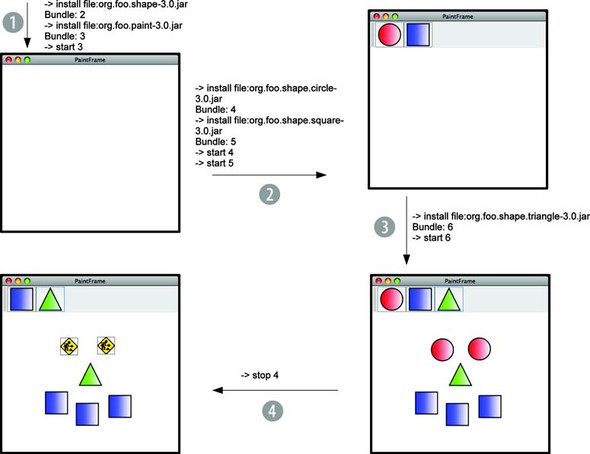
Let’s look at how you can use the individual parts of the lifecycle layer to dynamically extend the paint program. As you’ll recall from the last chapter, you first converted a nonmodular version of the paint program into a modular one using an interface-based programming approach for the architecture. This is great because you can reuse the resulting bundles with minimal extra work. The bundles containing the shape implementations don’t need to change, except for some additional metadata in their manifest. You just need to modify the paint program to make it possible for shapes to be added and removed at execution time.