concept permission in category osgi

This is an excerpt from Manning's book OSGi in Action: Creating Modular Applications in Java.
The BundleContext.getDataFile() method provides access to your bundle’s private data area. When using the private data area, you don’t need to worry about where it is on the file system because the framework takes care of that for you, as well as cleaning up in the event of your bundle being unin-stalled (see figure 3.15). It may seem odd to not directly use files to store your data; but if you did, it would be impossible for your bundle to clean up during an uninstall. This is because a bundle isn’t notified when it’s uninstalled. Further, this method simplifies running with security enabled, because bundles can be granted permission to access their private area by the framework.
Maintains a set of permissions granted to a given bundle. All classes loaded from a bundle are associated with the bundle’s protection domain, thus granting them the permissions granted to the bundle.
To understand how protection domains enable permission checking, consider code that performs a sensitive operation, such as creating a file. The code in the JRE for file access performs security checks internally to make sure the invoking code has permission to perform the operation. Internally, the code associated with performing file system operations triggers a specific permission check by using the security-checking methods of SecurityManager or AccessController. When triggered, the JVM collects the ProtectionDomains of all classes on the call stack leading to the invocation of the sensitive operation. It checks that each protection domain on the call stack has at least one permission implying (granting) the specific permission being checked by the method. Figure 14.1 shows how this looks in practice.
Figure 14.1. The JVM checks permissions by collecting all protection domains associated with classes on the call stack and seeing if each involved protection domain has the specified permission granted to it.
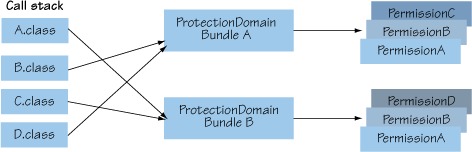
In this case, assume that class D performs a sensitive operation that triggers an internal permission check using the AccessController.checkPermission(Permission p) method. This checks whether at the point of the permission check, all protection domains on the call stack have permission p. Looking at figure 14.1, the JVM performs a stack walk from the class performing the security check and determines that classes A, B, C, and D are involved. Subsequently, it determines that classes A and C originate from the protection domain of Bundle B, and classes B and D originate from the protection domain of Bundle A. With this information, the JVM checks whether all protection domains have some permission implying the checked permission. If not, then a security exception is thrown.
If you’re at all familiar with standard Java permission management, you know that the basic approach is to grant permissions to code using a policy file. A standard Java policy file may look something like this:
grant signedBy "sysadmin" {
  permission java.security.AllPermission;
};
grant codeBase "file:/app/main.jar" {
  permission java.security.AllPermission;
};
grant {
  permission java.io.FilePermission "/tmp/*", "read,write";
};
In this policy file, you granted all permissions to classes signed by sysadmin and from file:/app/main.jar. All other classes are only granted read/write access to the /tmp/ directory. Although this example assigns only a single permission for each case, you can assign any number of permissions in a single group. When the security manager walks up the call stack to check permissions at execution time, the permissions for a given class are determined by effectively using either its signer or code base as a key to look up the associated protection domain to see which permissions have been granted to it. If the protection domain has the permission, the call can proceed; if not, the call fails.
Here, access is the access decision (either ALLOW or DENY), conditions is zero or more encoded conditions, permissions is one or more encoded permissions, and name is the name associated with the ConditionalPermissionInfo object. Drilling down, the encoded format of a ConditionInfo is
Until now, we’ve talked mostly about the details of permissions (what they look like and what they mean) and otherwise glossed over how you grant permissions to bundles. Individual permissions in and of themselves aren’t that useful. The useful part is being able to grant and manage permissions for groups of bundles in accordance with your desired security policies. To help you achieve this goal, the OSGi specification defines the Conditional Permission Admin Service.