concept Ajax in category php

This is an excerpt from Manning's book Zend Framework in Action.
We have looked at the goals of the site and at how the user interface will work, so we can now look at how we will organize the PHP code. As with the UI, we need to ensure that our code will not be “hemmed in” when the site’s functionality and feature lists grow. We also want the system to do as much of the plumbing automatically for us, so, for instance, we don’t have to worry about finding the correct class in the file structure, choosing the name of a view script, or struggling to relate to database tables. We will also be using Ajax and so will need to change the output format of the view from HTML at times.
Ajax is a way of using JavaScript to create interactive web pages that send data to and from the server behind the scenes. This means that the user doesn’t see the full page refresh and that a website is more responsive and feels faster to the user. As a result, a web application, such as a web-based email client, behaves more like its desktop cousins. Although it is server-based, Zend Framework’s MVC system, which separates different layers of the application, helps make it easier to add Ajax functionality to your websites.
In this chapter, we will look at what Ajax is and how it is used in web applications. We’ll also examine all the components that make up a simple example in both pure JavaScript and using prebuilt Ajax libraries. We will also integrate Ajax into a Zend Framework application so that we can investigate how Ajax interacts with the MVC system. First, let’s look at exactly what Ajax is.
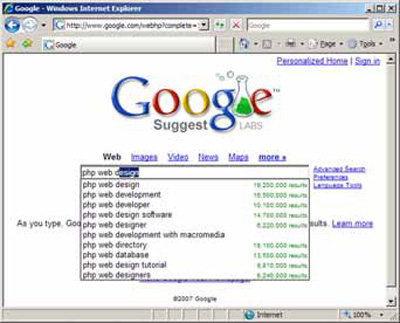
Figure 5.1. Google Suggest was developed in Google’s labs incubator and uses Ajax to provide contextual auto-completion.
There are advantages and disadvantages to using Ajax. The main advantages are that the UI is more intuitive, the user’s workflow is interrupted much less, the application feels more responsive, and less bandwidth is used because only the required data is sent from the server. The main disadvantage is that Ajax applications tend to break well-known browser features, such as the back button and reliable URLs on the address bar for bookmarks or emailing to other people. There are additional UI issues for the web designer to be concerned about, such as providing notification of processing because Internet Explorer’s (IE) “spinning globe” no longer performs this task. Websites that use Ajax can also have problems with adhering to the WAI accessibility guidelines, so a fall-back system is often required.
Ajax came into use in 2005 as a way of describing the suite of technologies used to build dynamic websites, and the official expansion is Asynchronous JavaScript and XML. So, let’s look at each component technology in turn.