concept email in category php

This is an excerpt from Manning's book Zend Framework in Action.
Zend Framework is a comprehensive loosely coupled framework that contains everything you need to develop your application. This includes a robust MVC component to ensure that your website is structured according to best practices and other components for authentication, searching, localization, PDF creation, email, and connecting to web services, along with a few more esoteric items. These components can be grouped into the six categories shown in figure 1.3.
Now that we’re looking at the composition of our email, the first thing worth mentioning is that the email produced by listing 10.1 is simple enough that it sits comfortably within the specification for email, otherwise known as RFC 2822. The specifications for email are handled by the official internet body, the Internet Engineering Task Force (IETF), and it’s worth being familiar with some of this information because you’ll see references to it elsewhere. For example, the Zend Framework manual states that one of the validation classes, Zend_Validate_EmailAddress, “will match any valid email address according to RFC 2822.”
It was mentioned earlier in this chapter that Zend_Mail defaults to using Zend_Mail_Transport_Sendmail, which itself uses PHP’s mail() function. What that means is that, unless you decide otherwise, your emails are simply being composed and passed on to PHP’s mail() function, and from there to the local sendmail (or equivalent) mail server, which handles the actual transfer of the email.
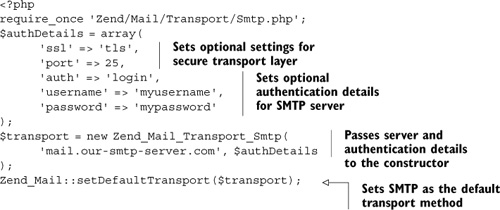
Because SMTP is the standard by which all mail is sent across the internet, our email is ultimately sent using SMTP even if we use sendmail. In this case, when we say “send via SMTP,” we mean setting up Zend_Mail to send email through a specified outgoing SMTP server in much the same way that we set up our email clients to send our mail. In listing 10.2 we’re setting up Zend_Mail to send via SMTP using the authentication required by the service provider and through a secure connection.
Having set up Zend_Mail to use the SMTP connection, we’re ready to use it, and since we mentioned sending large volumes of email, we’ll start with sending multiple emails.

This is an excerpt from Manning's book PHP in Action: Objects, Design, Agility.
In this chapter, we will be building the internal workings of a contact manager that implements persistence using the MysqlTransaction class from the previous chapter. Working test-first as usual, we will first implement the Contact class and its persistence feature. Then we’ll design and implement a feature that lets us send an email to a contact. To test that, we’ll be using mock objects. Finally, we’ll use a program called fakemail to test the sending of the email for real.
There is an appropriately named mail() function built into PHP. At first sight, the simplest thing that could possibly work is to use that. If we spray mail() calls all over our code, though, we will find ourselves sending emails on every test. Instead we use a separate Mailer class for this work. As we will see shortly, a Mailer class will be a requirement for building our padded cell or incubator. So let’s have a look at the basic class design to get a rough idea of what we’re aiming for (see figure 10.1). The Contact object will be able to send the message by using the Mailer, which is introduced as an argument to the Contact’s send() method.
Trying to test this brings on tougher challenges than before, since the end result is an email, and emails end up outside our cozy class environment. The obvious way to test whether an email has been sent by the Contact object is to set up the test to mail it to yourself. Then you run the test, wait a few seconds, and then check your incoming mail. This obviously won’t work if another developer is running our tests. It breaks our model of automating tests. How can we test email on a single click?
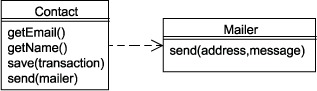
We want to be able to use the contact manager to send an email to a contact. To this end, we’ll put a send() method in the Contact class. It will accept the message text as an argument and send the text to the email address stored in the Contact object.