concept form in category php

This is an excerpt from Manning's book Zend Framework in Action.
Routing works by taking the part of the URI after the base URL (known as the URI endpoint) and decomposing it into separate parameters. For a standard URL, such as http://example.com/index.php?controller=news&action=list the decomposition is done by simply reading the $_GET array and looking for the controller and action elements. It is expected that most applications built using Zend Framework (like other modern applications) will use pretty URLs of the form http://example.com/news/list. In this case, the router will use the relevant variables in the $_SERVER super-global array to determine which controller and action have been requested.
Having said that, protecting our forms isn’t the only thing we need to take into consideration; they must also be usable. A form’s usability is difficult to determine without a reasonable period of testing, which actually means that there is a hidden requirement of form design—flexibility. Discovered insecurities, usability issues, updates, and additions to the underlying architecture may all require forms to change. A flexible system allows these changes to be made promptly and inexpensively.
We’ll start by creating the most minimal elements needed to render a form consisting of a username field, password field, and submit button. The first step, shown in listing 8.6, is to create our LoginForm.php file in /application/forms/ and add a log-inForm class that extends Zend_Form.
The first thing to note with this code is that the form is being set up within the init() method, which is a convenience method that is called from within the constructor of Zend_Form. It adds components of the form, starting with the form element and its various attributes, followed by the other elements of the form.

It’s interesting that Zend_Form is the first component in Zend Framework to be incorporated with its internationalization components. The benefit for our use is the ease with which we can change the form to show error messages in another language, such as the German version shown in listing 8.9.

This is an excerpt from Manning's book PHP in Action: Objects, Design, Agility.
In PHP 4, this is practically useless, since the checkbox inside the form inside the document won’t change. In PHP 5, it will change, and when we generate the HTML code from the Document object, it will have a checked checkbox. This is obviously what we want, and it illustrates what I mean when I say that the behavior of PHP 5 objects is mostly intuitive, useful, and natural.
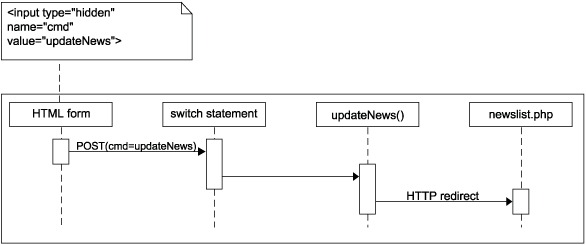
Figure 15.4. One possible sequence of events upon submitting the form in listing 15.2
Client-side mostly. Have a JavaScript for the form and run it when the user submits it. If you need server-side validation, you can add it when necessary. This strategy was common some years ago and may still be viable in an application to which only selected users have access, such as a private intranet; otherwise it is too insecure.
Form generation. This is a more ambitious strategy that involves having all the information about the form—including validation rules—in one place (typically PHP code or some kind of XML representation of the form) and using that both to generate the form and to read the information needed to validate.
Form generation with JavaScript. Frameworks and form handling packages often generate the form with JavaScript to validate it and handle server-side validation as well.