concept time in category php

This is an excerpt from Manning's book Zend Framework in Action.
If you are anything like us, learning how a vast body of code works is difficult! Fortunately, Zend Framework is modular, encouraging developers with a “use at will” design philosophy that helps make it easy to learn, one step at a time. Individual components don’t depend on lots of other components, so they are easy to study. The design of each component is such that you do not need to understand how it works in its entirety before you can use it and benefit from it. Once you have some experience in using the component, learning to use the more advanced features is straightforward, as it can be done in steps. This reduces the barrier to entry.
Most websites are written in a single language for a single country, and this makes life easier for both the designers and developers. Some projects, however, require more than this. Some countries have more than one language (in Wales, both English and Welsh are used) and some websites are intended to target all the countries that the company operates in. To create a website targeted at different countries and cultures, significant changes to the application are required to support multiple languages and the different formats for dates, times, currency, and so on, that each country uses.
Clearly, we can then use this information to provide websites in the correct language with the right formatting of dates, times, and currencies, which will make our user feel right at home. Let’s look at numbers first.

This is an excerpt from Manning's book PHP in Action: Objects, Design, Agility.
The traditional alternative is typically to emphasize up-front design. The idea is that you need to plan well ahead and design everything in a relatively detailed manner before you start to code. And if you’re good at doing the design, the resemblance between what you do and what the customer needs will be sufficient to get you through to the first release without major problems. But along the way, you will probably have yielded to the temptation to make some changes that weren’t planned, but make the software more palatable to the users. The fact is that user requirements change, and this tends to corrupt pretty designs. As programming guru Martin Fowler puts it: “Over time the code will be modified, and the integrity of the system, its structure according to that design, slowly fades. The code slowly sinks from engineering to hacking.” [Fowler Refactoring]
The problem is illustrated by the so-called cost-of-change curve. With time, it becomes increasingly time-consuming and costly to change the software. The problem is often illustrated in an approximate manner by something like an exponential curve, as in figure 1.1.
In this chapter, we will look at why we want to take an object-oriented approach to date and time handling. We’ll discuss what abstractions and concepts need to be represented. Then we’ll study a couple of important design challenges that arise in the process. Since date and time classes are prime candidates for reuse, we need to know how to deal with large-scale structure to understand how they can fit into an application. We also look at value objects; they are another object-oriented technique that is particularly useful in the date and time domain. Finally, we see the highlights of a possible implementation.
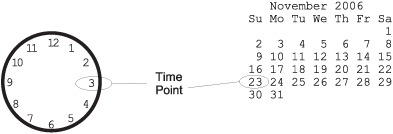
The typical time point representation in PHP is at a precision of one second. One of these might be represented as, for example, November 16 2006 3:05:45 p.m. But in business transactions, the time of day is sometimes irrelevant, and the only thing that matters is on which day an event (such as a payment) occurs. So what we need is a lower-precision object that only handles the date, November 16 2006. Figure 8.1 illustrates this ability of time points to have different precisions.
<html>
<head>
<style>
.rfcdate { display: inline; }
.isodate { display: none; }
</style>
</head>
<body>
The current date is
<span class="isodate">2004-04-29</span>

<span class="rfcdate">Thu Apr 29 2004</span>
and the time is 10:30 PM.
</body>
</html>