concept Zend_Translate in category php

This is an excerpt from Manning's book Zend Framework in Action.
Zend Framework provides the Zend_Locale class, which is responsible, along with Zend_Currency and Zend_Measure, for ensuring that the correct language and idioms are used. The Zend_Translate component is concerned with the actual translation of a website’s text into the desired language.
We’re going to look at what needs to be done to make a multilingual website, then look at how the Zend_Locale and Zend_Translate components of Zend Framework help to make the process easier. Finally, we’ll implement a second language into the Places website to show how to create a localized application.
As we’ve already seen, website translation requires, at a minimum, ensuring that every string that is displayed has a translated version. The most common way to do this is with gettext(), which is powerful but fairly complicated. Zend_Translate supports the gettext() format but also supports other popular formats such as arrays, CSV, TBX, Qt, XLIFF, and XmlTm. Zend_Translate is also thread-safe, which can be very helpful if you’re running a multithreaded web server, such as IIS.
Zend_Translate supports multiple input formats using an adapter system. This approach is very common in Zend Framework and allows for further adapters to be added as required. We’ll look at the array adapter first, because that’s a very simple format and very quick to learn. Its most common use is with Zend_Cache, to cache the translations from one of the other input formats.
Using Zend_Translate is simple enough. In listing 15.4, we output text using pretty ordinary PHP and repeat the exercise in listing 15.5 using Zend_Translate’s array adapter. In this case, we make life easier by “translating” to uppercase, but we could equally have translated to German (if any of us knew enough German to avoid embarrassing ourselves).
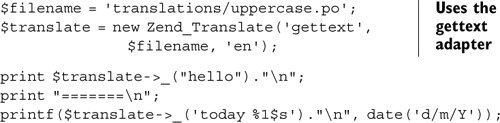
The process of using gettext() source files with Zend_Translate is as simple as picking a different adapter, as shown in listing 15.6.